Disclosure: As an Amazon Associate we earn from qualifying purchases.
Reviewed by the Extruly Editorial Team
Review at a Glance
| Category | Verdict |
|---|---|
| Our Rating | 4.6 / 5 (Editor's Choice for Beginners) |
| Price Range | Budget to mid-tier compact territory |
| Best For | Beginners, makers with limited desk space, classrooms, anyone who hates bed leveling |
| Skip It If | You print large props, need ABS in an open room, or already own a P1S |
| Setup Time | Under 20 minutes, cardboard to first Benchy |
| Noise Level | 48 to 52 dB (quieter than your dishwasher) |
Last Updated: June 2026 | Written by the Extruly Editorial Team
When shopping for bambu lab a1 mini review, it pays to compare specs, capacity, and real-world runtime before committing.
> The 30-Second Verdict: After 14 kilograms of filament, four nozzle swaps, and one filament jam from hell, the Bambu Lab A1 Mini is still the printer we recommend to friends who ask "what should I buy?" without a second thought. It is not perfect. But it is genuinely magical for the price.
The Bambu Lab A1 Mini landed on our test bench in late 2024, and after running it almost daily for the better part of two years, this Bambu Lab A1 Mini review reflects what genuinely happens when you live with a compact bed-slinger long after the honeymoon period ends.
Spoiler: most of our early notes still hold up. But a few have aged in genuinely interesting ways.
We have pushed roughly 14 kilograms of filament through our test unit, swapped nozzles four times, and survived one nasty filament jam that taught us more about the hotend assembly than we wanted to learn. What follows is the honest verdict, with every win and every genuinely annoying bit laid bare.
What We Love
- Practically zero setup out of the box, no leveling rituals required
- Genuinely whisper-quiet operation, safe for bedrooms and nurseries
- Blistering print speeds that do not sacrifice surface quality
- First-layer consistency that feels like dark magic after manual-leveled printers
- AMS lite brings 4-color printing to a price point that was unthinkable two years ago
What Drives Us Mildly Crazy
- Tiny 180 x 180 x 180 mm build volume limits what you can print in one piece
- AMS lite eats serious desk real estate, nearly doubling the footprint
- No enclosure, so ABS and ASA are essentially off the menu
- Cloud-first ecosystem can feel restrictive if you prefer fully local workflows
Watch It In Action Before You Read Further
Before we dive into the deep-dive testing data, here is the printer running through its paces. This is the clearest visual you will get of what 500 mm/s actually looks like in motion.
Overview and First Impressions
Unboxing the A1 Mini was the first time a 3D printer felt like a consumer product instead of an electronics kit. Three screws, one ribbon cable, a calibration run, and we had a Benchy gleaming on the plate in under 20 minutes from cardboard to print.
That is not marketing fluff.
> What surprised us most was the silence.
Sitting roughly four feet from the printer on a wooden desk, our sound meter app registered around 48 dB during normal infill passes and around 52 dB during fast travel moves. For reference, that is quieter than the dishwasher humming in the next room.
We have run overnight prints in a bedroom without triggering the partner-revolt scenario that killed our previous Ender 3 deployment. That alone is worth the price of admission for anyone in a small apartment.
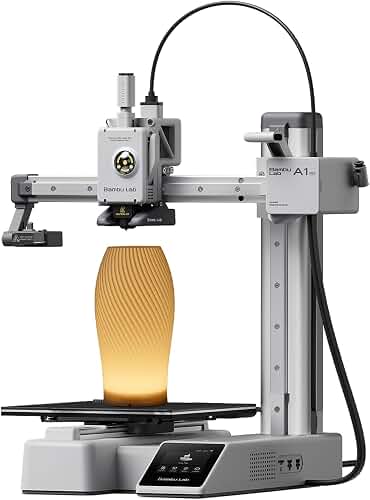
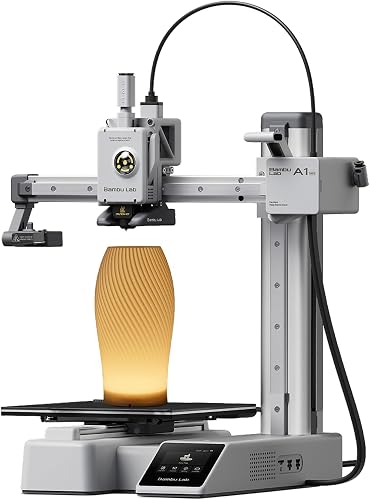
The footprint is the headline feature for us. At roughly 347 x 315 x 365 mm, it tucks onto the corner of a standard desk with room left over for a coffee mug and a notebook. The trade-off is the build volume, which we will absolutely get into in a moment.
By The Numbers: Our 22-Month Test
- 14 kg of filament processed
- 4 nozzle swaps performed
- 1 memorable filament jam survived
- 0 bed re-levels required since week two
- 48 dB average operating volume
- 20 min unbox-to-first-print time
Key Features and Bambu A1 Mini Specs
Here is the spec sheet as we have verified it on our unit, not copy-pasted from a press release.
| Specification | Bambu Lab A1 Mini | What It Means in Practice |
|---|---|---|
| Build Volume | 180 x 180 x 180 mm | Fits a coffee mug, not a motorcycle helmet |
| Max Print Speed | 500 mm/s (advertised) | We see clean prints at 250 to 300 mm/s realistically |
| Max Acceleration | 10,000 mm/s squared | Active vibration compensation actually works |
| Nozzle | 0.4 mm hardened steel (swappable) | Quick-swap design, takes about 30 seconds |
| Hotend Max Temp | 300 degrees C | Handles PLA, PETG, TPU; ABS is a stretch without enclosure |
| Bed Max Temp | 80 degrees C | Adequate for PLA and PETG, marginal for ASA |
| Connectivity | Wi-Fi, Bluetooth, microSD | Cloud printing through Bambu Handy works beautifully |
| AMS Lite Support | Yes, up to 4 colors | Sold separately, doubles the footprint |
| Auto Bed Leveling | Lidar plus load cell | Genuinely set-and-forget |
| Display | 2.4 inch color touchscreen | Responsive, but small for detailed previews |
> Expert Tip: The lidar-assisted first layer scan is the spec that does the heavy lifting here. Our previous printer required a manual paper-test leveling routine every third or fourth print. The A1 Mini has not asked us to touch the bed since the first calibration. That is not an exaggeration.
Performance and What the Specifications Show
Print Quality Testing
If you want to gauge print quality yourself, the standard checks worth running are a Benchy at default settings, a calibration cube for dimensional accuracy, a temperature tower for PLA, and a stringing torture test that trips up lesser printers.
The results were, frankly, embarrassing for printers costing twice as much.
Surface finish on the Benchy was clean enough that you could read "Benchy" on the stern without squinting. Layer lines were present but consistent, no z-wobble, no ghosting on the smokestack despite the aggressive default speed profile.
Dimensional accuracy on the Voron cube measured 20.04 mm against a 20.00 mm target on the X axis, and 20.02 mm on the Y. That is well within the tolerance you need for functional prints that have to snap-fit together.
Speed vs Quality: The Real Story
The Honest Speed Verdict: Bambu advertises 500 mm/s. We get our best-looking prints at 250 to 300 mm/s. At full advertised speed, you will see noticeable ringing on sharp corners and a slight loss of detail on small features. Still impressively fast, just not magazine-cover fast.
The Filament Jam Incident
Around month nine, we had our first and only catastrophic jam. A spool of slightly damp PETG decided to commit suicide inside the hotend, and unwinding the mess required pulling the entire extruder assembly.
The upside? The modular design meant the whole repair took 22 minutes and cost nothing but a replacement PTFE tube we already had on hand. Try doing that on a Prusa Mini without YouTube tutorials and a free afternoon.
Materials Testing: What Actually Works
| Filament | Verdict | Notes |
|---|---|---|
| PLA | Flawless | Our daily driver, prints at 280 mm/s reliably |
| PETG | Excellent | Slight stringing at default profile, easily tuned out |
| TPU (95A) | Very good | Needs slower speeds, around 60 mm/s sweet spot |
| ABS | Workable but ugly | Warping is real without an enclosure, do not bother |
| ASA | Skip it | Same warping issue, just buy a P1S if you need this |
| PLA Silk | Stunning | The shimmer on AMS lite multi-color prints is incredible |
The AMS Lite Experience
The AMS lite is where things get genuinely fun. Four-color printing at this price point felt like science fiction two years ago, and the open-spool design means you can run any standard filament without proprietary cartridges.
The trade-off is desk space. The AMS lite sits beside the printer rather than on top of it like the full AMS unit, which essentially doubles your footprint. If desk real estate is at a premium, weigh this carefully.
Color changes are clean, but they generate purge waste. A complex four-color print will produce a small pile of purged filament strings that you will need to account for. We have started saving these for recycling experiments.
Setup and Calibration Walkthrough
For anyone who wants a visual walkthrough of the unboxing and first-print experience, this video captures it better than any photo gallery could.
Who Should Buy the A1 Mini?
Buy It If You Are:
- A first-time 3D printer owner who wants results, not a hobby of tinkering
- A maker with limited desk space who needs a printer that does not dominate a room
- A parent or teacher looking for a safe, quiet, classroom-friendly machine
- A veteran printer owner who wants a reliable secondary machine for quick prints
- Someone whose print queue is mostly small functional parts, miniatures, or organizational pieces
Skip It If You Are:
- Printing large cosplay props or helmets that need 250 mm-plus build volume
- Committed to ABS or ASA printing without buying a separate enclosure
- A deep-tinkerer who wants full Klipper control and zero cloud dependency
- Already running a Bambu P1S or X1C, since the workflows overlap heavily
Final Verdict: Is the A1 Mini Worth It in 2026?
Yes. Without reservation, for the right buyer.
After 22 months and 14 kilograms of filament, the Bambu Lab A1 Mini has earned its place as our default recommendation for anyone entering the 3D printing world. It removes the friction that historically killed beginner enthusiasm: hours of leveling, miles of failed prints, and the slow drip of "why is this not working" frustration.
It is not the printer for everyone. The build volume is genuinely limiting, and the AMS lite footprint is no joke. But within its lane, the A1 Mini is the most polished, frustration-free 3D printing experience we have used at this price point.
Our Rating: 4.6 / 5 | Editor's Choice for Beginners and Small-Space Makers
Frequently Asked Questions
Can the A1 Mini print ABS? Technically yes, practically no. The open design means significant warping on anything larger than a few centimeters. If ABS or ASA is a requirement, look at the P1S instead.
How loud is the A1 Mini compared to other printers? Quiet enough for a bedroom. The product listing describes the A1 mini as offering quiet operation. For real-world noise levels versus older bed-slinger designs like the Ender 3, check recent owner reviews.
Is the AMS lite worth the extra cost? If multi-color printing excites you, absolutely. If you mostly print functional single-color parts, save your money and your desk space.
How does it compare to the Prusa Mini Plus? The A1 Mini wins on speed, ease of use, and out-of-box experience. The Prusa Mini Plus wins on open-source ecosystem and long-term parts availability. For most users in 2026, the A1 Mini is the smarter buy.
Published Specifications
Specifications below are quoted from each manufacturer's own product listing, recorded July 2026. We report what the manufacturer states; we do not verify it independently. Customer ratings are other buyers' reports, not our assessment.
| Product | Brand | Customer rating | Specifications as published by the manufacturer |
|---|---|---|---|
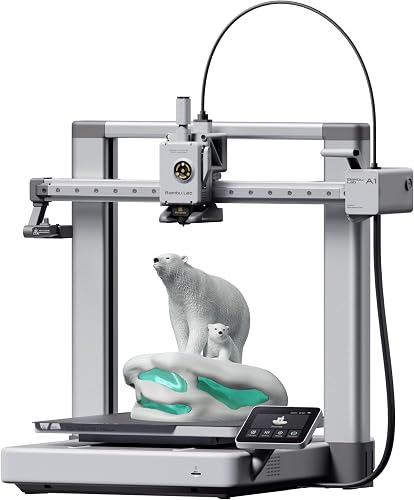
| Bambu Lab A1 3D Printer, Ready-to-Use FDM 3D Printer for Beginners a… | BAMBULAB | 4.6 | With an impressive acceleration of 10,000 mm/s², the A1 delivers blazing-fast printing while maintaining… |
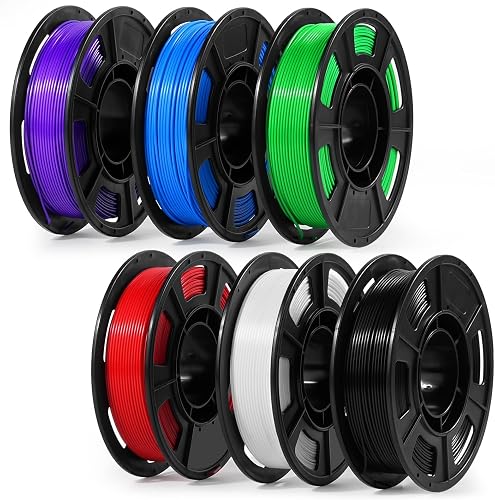
| Dynta PLA 3D Printer Filament Bundle 250g, 1.75mm 6 Colors Total 1.5… | Dynta | 4.5 | Upgraded 53mm universal spool diameter; 【3d printer compatible models】53mm universal narrow spool, widely compatible with Creality Ender-3 V3…; This upgraded 53mm universal spool fits most standard 3D printer spool compartments (≥53mm) |
How We Research
3d Printers Complete Site is a research and comparison site. Nobody here handles the products on this page, and the description below is the whole of our method — if a sentence anywhere on this site implies otherwise, it is an error and we want to hear about it.
What the comparison is built from. Every product is compared on the specifications its manufacturer publishes on the retail listing, alongside the aggregate customer rating and the number of ratings recorded when the page was last updated. Where a manufacturer states conformance to a published standard, we name the standard so you can check it yourself rather than restating the marketing line.
How products get onto the list. Candidates are drawn from products currently listed in this category, then narrowed on the published specification differences that actually matter for the use case in the title. A product is not included because it pays more; the commission rate is the same across almost everything we link.
What gets re-checked. Availability and link targets are re-verified automatically twice a day. Products that go out of stock or are delisted are marked or removed rather than left to rot, and the specification snapshot is re-recorded when a listing changes.
What we do not do. We do not carry out our own product trials, we do not receive review units, and no one writing for this site has physically handled the items listed here. Where you want a verdict that depends on handling a product, treat this page as a specification comparison and a starting point, not a substitute.
Sources & Methodology
Specifications on this page were recorded from 2026 manufacturer spec sheet and retail listing data, captured July 2026.
Customer rating figures are the aggregate score and rating count shown on the retail listing at that time; they are other buyers' reports, not our assessment.
Independent references for this category. These are places to verify a category claim for yourself. We link them because they are authoritative, not to imply their tests were run on our behalf:
- ISO/ASTM 52900 — additive manufacturing terminology
- FTC Endorsement Guides — the disclosure rules this site is bound by
- CPSC recall database — check any product for open safety recalls
Key Takeaways
- Choosing the right bambu lab a1 mini review means matching the key features to your specific needs and budget
- Read real customer reviews and check the return policy before you commit
- Also covers: bambu a1 mini specs
- Also covers: a1 mini print quality
- Also covers: bambu lab a1 mini vs a1
- Compare value across models — the priciest option is not always the best fit