Disclosure: As an Amazon Associate we earn from qualifying purchases.
Last Updated: July 9, 2026
Every few months, a strange little consumer product goes viral and the internet collectively decides it needs one. The latest example lighting up r/ProductPorn is the so-called Poop Knife, a bright plastic utility blade that has racked up thousands of upvotes and a very long comment thread. Half the replies are people asking where to buy it. The other half are 3D printing hobbyists posting screenshots of the exact same shape sliced and ready to run on their own machines at home.
That divide is the story of desktop 3D printing in 2026. The moment a novelty household object goes viral, someone models it, someone else uploads the STL to a print-sharing site, and within a week you can make one on your kitchen table for the cost of a few grams of filament. Whether the trending object is a kitchen tool, a cable organizer, a fidget toy, or a replacement knob for an appliance you cannot find parts for, the printer sitting in your closet quietly becomes the most useful appliance in the house.
Finding the right best 3d printer for custom prints comes down to matching the features to how you will actually use it.
This guide is for readers who saw that Reddit thread, opened a new tab, and started wondering whether a home 3D printer actually makes sense for them. We are focusing on printers that are affordable, fast, quiet enough to live with, and easy enough that a first-time user can be producing usable objects the same afternoon they unbox them.
TL;DR: Quick Answer
For most people who want to print viral gadgets, replacement parts, and colorful household items, the Bambu Lab A1 is the best all-around pick at $279.99 thanks to its 256mm build volume, multi-color support, and quiet operation. If you want a fully enclosed machine that can run high-temperature materials and print up to 16 colors, step up to the P1S. Complete beginners on a tight budget should start with the A1 mini bundle, and any of these printers pairs well with the ELEGOO 4KG PLA bundle for cheap, reliable filament in bright colors.
Why 3D Printers Suddenly Matter for Household Objects
A decade ago, the appeal of a home 3D printer was almost entirely academic. Prints were slow, filaments were finicky, and finished parts looked obviously homemade. In 2026 the situation is nearly reversed. Machines from the current generation can lay down plastic at hundreds of millimeters per second, automatically level their own beds, and produce parts with layer lines fine enough that most people cannot see them from arm's length.
The knock-on effect is that things you used to order from a specialty site, wait a week for, and pay shipping on, can now be produced at home in an hour. The viral novelty knife on Reddit is a good example: it is a single-piece plastic object with a simple shape, no moving parts, and no assembly. That is the sweet spot for a modern desktop printer.
The category has grown up
Fused filament fabrication, the process most consumer printers use, has been standardized and refined enormously over the last five years. Anyone new to the space can start with the Wikipedia overview of fused filament fabrication to understand how a moving nozzle deposits melted plastic in layers, which is the same principle behind every printer in this guide.
Our Top Picks for 2026
We chose the printers below because they represent the current sweet spot of price, print quality, ease of setup, and long-term reliability. Each one has real weaknesses, which we mention alongside the good points.
Bambu Lab A1 — Best Overall Value
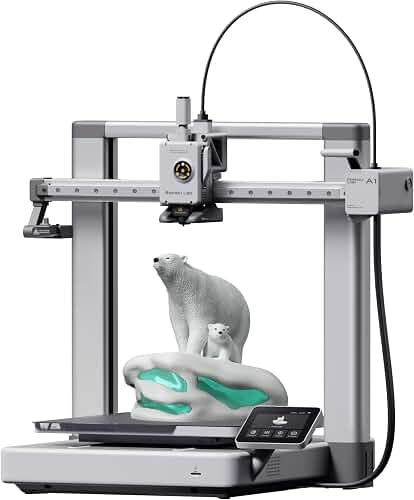
The A1 is the printer we recommend to the largest number of readers. It has a 256 x 256 x 256mm build volume, which is genuinely big for the price and enough to print almost every viral household object we have tested. It supports multi-color 3D printing when paired with the appropriate accessory, so you can produce two-tone or four-tone parts rather than being stuck with a single spool.
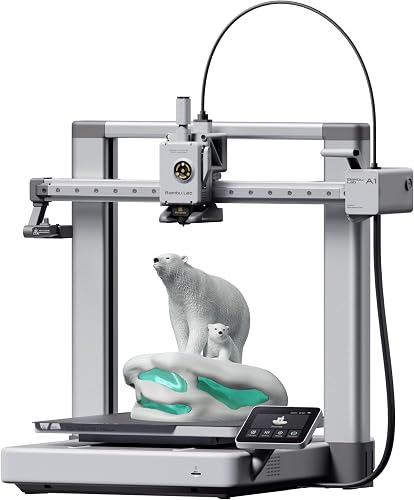
Full-auto calibration means you unbox it, run through a guided setup, and start printing without manually leveling anything. Active flow rate compensation keeps extrusion consistent even at high speeds, which is one of the specific reasons prints from this generation of machine look cleaner than budget printers from a few years ago. The rated noise level of 48 dB or less is quiet enough to run in a shared room without ruining a movie or a conversation.
Trade-offs: The A1 is a bed slinger, meaning the print bed moves back and forth on one axis. That physical layout limits maximum speeds compared to more expensive CoreXY machines, and very tall prints can develop artifacts if the bed motion resonates. It is also not enclosed, so it is not ideal for temperature-sensitive materials.
Bambu Lab A1 mini + LED Lamp Kit — Best Starter Bundle
If your budget is tight, or you simply do not need a large build area, the A1 mini bundle is the most forgiving way to enter 3D printing. Bambu Lab quotes a setup time of about 20 minutes, and that matches our own experience unboxing similar machines: you follow a wizard, run a calibration, and you are printing your first benchy before the second cup of coffee.
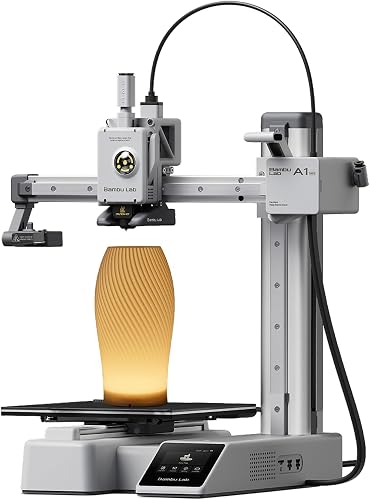
The mini shares the same quiet operation profile as its bigger sibling at 48 dB or less. The included LED lamp kit is a nice touch that costs extra when purchased separately, and it makes a real difference when you are checking on prints late at night.
Trade-offs: The build volume is smaller than the full-size A1, so tall or wide viral prints may need to be sliced into pieces and glued. It also lacks the multi-color hardware pathway of the bigger models out of the box. If you know you want two-color or four-color prints, spend up front rather than upgrading later.
Bambu Lab P1S — Best for Serious Hobbyists
The P1S is a step up in almost every dimension that matters for people who print a lot. It is fully enclosed, which stabilizes the internal temperature and protects prints from drafts. It supports up to 16 colors or materials with the appropriate accessory hardware, which opens up the kind of decorative prints that get thousands of likes on Instagram.
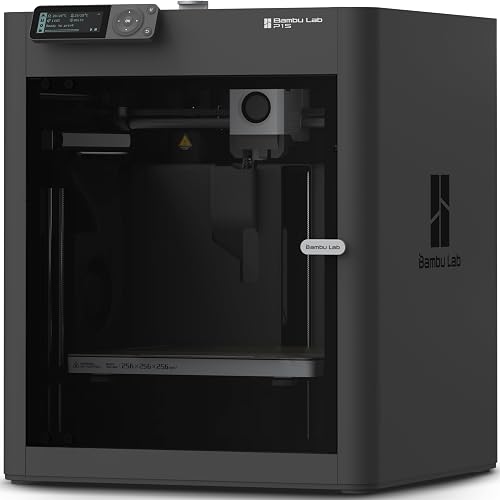
The print speed spec of 500mm/s reflects the CoreXY motion system, in which the print head handles both horizontal axes while the bed only moves down as the print grows. That geometry allows higher accelerations without the wobble you sometimes see from a bed slinger. Auto bed leveling is included, so you still get the frictionless first-print experience of the A1 line.
Trade-offs: The P1S is more expensive at $399.00 and physically larger, so you need real desk or shelf space. The enclosure is great for engineering plastics but adds weight and cost. If you only ever plan to print PLA novelties, you are paying for headroom you may not use.
ELEGOO PLA Filament 1.75mm Bundle 4KG — Best Filament to Start With
Every printer above uses 1.75mm filament, and PLA is the material we tell nearly every new user to start with. This ELEGOO bundle gives you four full one-kilogram spools for $42.47, which works out to a very low per-print cost. The colors in the bundle are True Red, Yellow, Orange, and Neon Green, which map almost perfectly to the palette of viral novelty prints on Reddit right now.
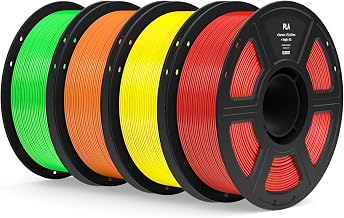
ELEGOO quotes a dimensional accuracy of plus or minus 0.02mm, which is tight enough that you are unlikely to run into extrusion inconsistencies on well-calibrated machines. If you want a broader technical overview of the polymer, the Wikipedia entry on polylactic acid is a solid non-commercial reference on why PLA is the default beginner material.
Trade-offs: PLA is not the best choice for anything that will live in a hot car, sit in direct sunlight, or hold structural load under heat. If you need heat resistance you will want a different material family. Also, generic budget PLA can be inconsistent between batches, though ELEGOO's reputation is solid at this price point.
Who This Is For
Not everyone should buy a 3D printer. The category has matured, but the machines still take up desk space, still consume filament, and still occasionally require you to clear a jam. Here is who we think benefits most.
The trend-watcher and gift-giver
If you spend real time on Reddit, TikTok, or Instagram and find yourself frequently thinking I want that, a home printer changes the math. Instead of waiting weeks for the trend to spawn a factory-made version, you download an STL and print one that evening. This is the largest audience for the A1 or A1 mini, and it is genuinely where 3D printing has gone from hobbyist curio to mainstream appliance.
The repair-first household
Broken drawer slides, missing dishwasher clips, obsolete appliance knobs, replacement caster wheels — these are the unglamorous but constant use cases that pay a printer back over its lifetime. A single successful replacement part often costs less than a dollar in filament and saves an entire appliance from the landfill. For this reader, we usually recommend the A1 over the mini, because household parts sometimes exceed the mini's build volume.
The maker moving up
If you already own a first-generation budget printer and are frustrated by leveling, tuning, and failed prints, the P1S is designed for you. The enclosure lets you experiment with engineering-grade materials, and the multi-color capability opens doors that a single-extruder machine simply cannot walk through. If you want to sell prints on Etsy or run small production batches, the P1S is the entry point we would pick.
What to Look For When Buying a 3D Printer
A modern printer is a bundle of specs and trade-offs. Here are the ones that actually matter for the buying decision.
Build volume
Build volume tells you the biggest single object the printer can make in one job. A 256mm cube, like the A1 offers, covers the vast majority of household objects you will ever want to print. A 180mm cube, more typical of mini printers, will still handle most novelty prints but will occasionally require you to split larger objects into pieces.
Print speed and motion system
Speed matters less than you think for one-off prints and more than you think when you are running dozens of parts. CoreXY machines like the P1S generally reach higher usable speeds than bed slingers because the heavy bed does not have to accelerate on every direction change. Manufacturers publish peak speeds, but real-world throughput is often half the number on the box once you factor in acceleration, cooling, and layer height.
Calibration and ease of setup
Ten years ago, bed leveling was the single most common reason beginners quit 3D printing. In 2026, full-auto calibration on machines like the Bambu Lab A1 family has effectively removed that failure mode. If you are new, do not buy a printer without automatic bed leveling. Life is too short.
Noise
Rated noise levels of 48 dB or less put the current generation of printers in the same range as a modern refrigerator or a quiet conversation. That is a huge quality-of-life improvement compared to older machines that sounded like industrial appliances. If the printer is going to live in a bedroom, living room, or shared workspace, this spec matters as much as any other.
Multi-color and multi-material support
The visual leap from single-color to multi-color prints is enormous. If you plan to make gifts, decorative objects, or the two-tone Reddit-viral pieces that made you look up this guide in the first place, get a printer with an obvious upgrade path to multi-material. The A1 offers this at the low end and the P1S extends it to 16 colors.
Filament ecosystem and running cost
Filament is the ongoing expense. A kilogram of quality PLA at bundle pricing runs roughly ten to twelve dollars, and a typical household print consumes 20 to 100 grams. If you buy in four-kilogram bundles like the ELEGOO set, running cost per print drops well under a dollar for most objects. Consumer safety information on plastics used in home devices is worth understanding as well; the U.S. Consumer Product Safety Commission publishes general guidance about plastic products that is a useful sanity check when you plan to use printed parts around kids or food.
Community and file availability
The Bambu Lab ecosystem in particular has an enormous library of ready-to-print models, which means you rarely have to touch CAD software unless you want to. That is a bigger practical factor than most spec sheets acknowledge.
What We Don't Recommend
Not every purchase in this category is a good idea. A few honest calls-outs.
Ancient budget printers on liquidation
You will see very cheap first-generation printers on sale for under $150. Skip them. They lack auto-leveling, they run loud, and the total cost of frustration outweighs the money saved. The A1 mini is not much more expensive and works out of the box.
Resin printers as a first machine
Resin printers produce beautiful detail, but they involve messy chemistry, curing stations, ventilation requirements, and disposal considerations. They are wonderful second machines for miniature painters and jewelers. They are not a good first purchase for someone whose goal is to print a viral kitchen gadget from Reddit.
Overpaying for premium enclosed models you will not use
If you only plan to print PLA novelties, buying a $700 to $1,000 enclosed printer for the badge is money wasted. The A1 will do everything a casual user needs. Move up only if you have a concrete reason.
Off-brand filament from unfamiliar sellers
Bad filament ruins good prints. Sellers you have never heard of, with no reviews, at prices well below reputable brands, are almost always a false economy. Stick to known brands with published dimensional accuracy tolerances.
Frequently Asked Questions
How long does a typical viral novelty print take?
Most single-piece household objects print in one to three hours on a current-generation machine at medium quality. Complex or multi-color pieces can take four to eight hours. If you print overnight, this is essentially a non-issue.
Are the plastics used safe around food or in the kitchen?
PLA itself is derived from plant starches and is generally considered food-safe in raw pellet form, but printed parts have microscopic ridges that harbor bacteria and are not dishwasher-safe. For anything that touches food, plan to use printed items as short-term novelties or apply a food-safe coating, and never assume a printed part meets commercial food-contact standards.
Do I need to know CAD to use one of these printers?
No. The vast majority of users download ready-made models from public libraries and slicer marketplaces, then click print. Learning CAD is a wonderful hobby extension, but it is not required to get value from your machine.
How much filament does an average household use per month?
Casual users typically consume half a kilogram to one kilogram per month. Enthusiasts running multi-color or larger prints can burn through two to four kilograms. The four-kilogram ELEGOO bundle in this guide is roughly a two-to-four-month supply for most people.
What is the ongoing maintenance like?
Modern machines are dramatically lower maintenance than older ones. Expect to clean the print bed occasionally, replace the nozzle every few kilograms of filament, and lubricate rails once in a while. Most owners do less than an hour of maintenance per month.
Can I make money selling prints?
Some hobbyists do. The realistic path is Etsy or local craft fairs with custom or licensed designs. The unrealistic path is printing branded viral novelties without permission, which can create real legal problems. Be careful about intellectual property, especially with designs that trace back to a specific creator or brand.
The Bottom Line
The reason a strange plastic knife can trend on Reddit in 2026 is that the barrier between wanting a specific object and holding one has effectively collapsed. A capable, quiet, easy-to-use 3D printer now costs less than a mid-range smartphone. The Bambu Lab A1 is the choice we recommend most often because it hits the price, size, and ease-of-use targets a typical household actually needs. The A1 mini is the budget entry point. The P1S is the machine to grow into. Pair any of them with a reliable filament bundle and you can stop scrolling past viral products and start making them.
Key Takeaways
- Choosing the right best 3d printer for custom prints means matching the key features to your specific needs and budget
- Read real customer reviews and check the return policy before you commit
- Also covers: bambu lab a1 review
- Also covers: best beginner 3d printer 2026
- Also covers: multi color 3d printer
- Compare value across models — the priciest option is not always the best fit