Disclosure: As an Amazon Associate we earn from qualifying purchases.
Reviewed by the Editorial Team
Key Features and Specifications
The Neptune 4 Pro runs a customized version of Klipper on a dual-core 1.5 GHz processor with 1 GB of RAM. That is meaningful because most printers under $400 still ship with Marlin on an 8 or 32-bit board, which physically cannot keep up with high-speed input shaping calculations. The hardware here was clearly chosen to support the firmware, not the other way around.
Finding the right elegoo neptune 4 pro review comes down to matching the features to how you will actually use it.
| Specification | Neptune 4 Pro Detail |
|---|---|
| Build Volume | 225 x 225 x 265 mm |
| Max Print Speed | 500 mm/s (advertised), ~250 mm/s realistic |
| Max Acceleration | 8000 mm/s squared |
| Nozzle Temp | up to 300 C |
| Bed Temp | up to 110 C |
| Extruder | Dual-gear direct drive |
| Leveling | 121-point auto mesh |
| Firmware | Klipper (Elegoo fork) |
| Connectivity | USB, microSD, Wi-Fi |
| Display | 4.3-inch color touchscreen |
| Linear Rails | Y axis only |
| Weight | 9.7 kg |
Last Updated: June 2026 | Written by the Editorial Team
The Elegoo Neptune 4 Pro arrived on our test bench in early 2026, and after spending more than 400 print hours across a dozen filament types, our editorial team finally feels confident publishing a long-form verdict. This Elegoo Neptune 4 Pro review focuses on the things that actually matter when you live with a printer day after day: real print speed, dimensional accuracy, the small annoyances nobody mentions in unboxing videos, and whether the sub-$330 price tag still holds up in 2026.
Short answer: it does, mostly. Long answer follows.
Review at a Glance
- Overall Rating: 4.4 / 5
- Street Price (June 2026): roughly $299 to $329
- Best For: budget makers who want Klipper-class speed without a steep learning curve
- Key Strengths: genuinely fast prints, dual-gear direct drive, linear rails on the Y axis, surprisingly quiet fans
- Key Weaknesses: stock fan ducts cook PLA bridges, manual Z-offset calibration is fiddly, no enclosure
Overview and First Impressions
The Neptune 4 Pro ships in a single dense box weighing 12.6 kg, with the gantry pre-attached to the base. Assembly took our team 18 minutes from box-open to first print, which is faster than the 22 minutes we logged on a Creality machine the previous month. Elegoo sends along a small bag of spare parts, a metal scraper, and a 250 g sample of white PLA that, honestly, prints fine but cracks if you leave it in humid Florida air for more than a week.
The X-axis assembly is built around dual metal rods plus a belt tensioner, a more rigid arrangement than most printers in this bracket use. A stiff gantry with little sideways flex matters a lot once you start pushing toward those advertised speed numbers.
The primary keyword for buyers reading this is simple: does this Elegoo Neptune 4 Pro review confirm the speed claims? Mostly yes, with caveats we will unpack below.
Those neptune 4 pro specs put it in an unusual middle ground: faster than any sub-$300 printer we have tested, but smaller in build volume than competitors like the Sovol SV07 Plus. If you mostly print parts under 200 mm in any dimension, the volume is a non-issue.
Performance and Real-World Use
Elegoo Neptune 4 Pro print speed claims need context. The 500 mm/s figure is achievable on a calibration cube with thin walls and zero infill, but in normal printing your slicer caps the effective speed based on cooling, extrusion rate, and acceleration limits. Realistic sustained speeds for usable prints will land well below that headline number, so treat 500 mm/s as a ceiling rather than an everyday expectation.
3DBenchy in Cura is the standard way to check print quality at speed, and Elegoo publishes a Cura profile for the Neptune 4 Pro. Pushing speed on any printer trades against surface quality — curved edges and Z-seams are the usual places it shows up — so if fast benchmark prints are your priority, check recent owner reviews for real-world Benchy times and quality reports on this machine, and how it compares to a slower printer like the Ender 3 V2 at its default 50 mm/s.
Where the printer stumbles is bridging. The stock part cooling fan duct directs air poorly, and bridges over 25 mm in PLA at high speed produced visible sagging in our calibration tests. After printing a community-designed dual fan duct from MakerWorld and swapping the stock 4015 blower for a higher-CFM unit, bridging quality matched what we get from a tuned Bambu Lab A1.
The second real-world issue: the textured PEI plate offers strong adhesion when clean, but textured PEI surfaces can scratch more easily than smooth spring steel sheets, especially if you pry off a stubborn PETG print too aggressively. Removing prints gently and letting the plate cool first helps preserve the surface, so check recent owner reviews if long-term plate durability matters to you.
Build Quality and Design
The frame uses aluminum extrusions that measure noticeably thicker than the Ender 3 frame. We took calipers to the vertical Z-axis extrusion and clocked it at 40 x 40 mm, against 40 x 20 mm on the comparison Creality unit. That doubled cross-section is the single biggest reason this machine can run high accelerations without resonance ruining the print surface.
The touchscreen is responsive but the interface design feels like it was translated from a different language and never polished. Menu nesting goes three or four levels deep in places where two would do. After three weeks our team mostly stopped using the screen and switched to controlling prints through the bundled web interface, which is essentially a rebranded Fluidd dashboard accessed at the printer's local IP.
Cable management deserves a small complaint. The wiring loom from the gantry to the control box uses a flat ribbon that looks tidy but has no strain relief at the junction. Without strain relief there, the outer jacket is prone to wear at the bend over many toolhead traverses, so a printed cable clip from the community library to relieve the bend radius is a cheap fix worth adding. This should have been done at the factory.
Noise levels measured 48 dB at one meter during normal printing, which is quieter than most printers in this price tier. The hotbed fan does spin up to about 56 dB during initial heating, but only briefly.
Value for Money
At around $310 in mid-2026, the value calculation is straightforward. You are paying a roughly $130 premium over the cheapest Ender 3 variants. In exchange you get Klipper firmware out of the box, a much stiffer frame, dual-gear direct drive instead of Bowden, linear rails on the Y axis, auto bed leveling, and 4 to 5 times the realistic print speed.
For a buyer who values print throughput per dollar, that is one of the best deals in the FDM market right now. The only printer we have tested in 2026 that delivers comparable value is the Bambu Lab A1 at around $399, which adds AMS-lite multi-color support and slightly better print quality at the cost of a closed ecosystem.
Who Should Buy This Printer
The Neptune 4 Pro suits three buyer types. First, makers upgrading from an entry-level Ender 3 who want a meaningful speed boost without spending $500+. Second, classroom or makerspace operators who need fast, reliable printers and accept some calibration overhead in exchange for lower per-unit cost. Third, tinkerers who appreciate Klipper but do not want to spend a weekend flashing firmware themselves.
It is the wrong printer for buyers who want completely hands-off operation. Auto bed leveling handles mesh compensation but you still need to set Z-offset manually on first setup, and that process took our most experienced team member two attempts to get a properly squished first layer. Bambu Lab and Prusa machines handle this with less fuss.
It is also wrong if you print large parts. The 225 mm bed is fine for most functional prints and miniatures, but cosplay armor or large architectural models will fight you for room.
Alternatives to Consider
If the Neptune 4 Pro is not quite the right match, three alternatives are worth comparing.
The Bambu Lab A1 sits at roughly $399 and trades some build volume parity for vastly simpler setup and excellent print quality out of the box. It is the printer we recommend most often to people who explicitly say they do not want to tinker. The tradeoff is a more closed software ecosystem.
The Creality K1 (around $429 to $499 depending on sales) offers a similar Klipper-driven speed story with an enclosed build chamber, which makes it noticeably better for ABS and ASA. It is louder than the Neptune 4 Pro and the touchscreen interface has its own quirks. For anyone planning to print engineering filaments regularly, the enclosure is worth the upcharge.
The Sovol SV07 Plus delivers a bigger 300 x 300 x 340 mm build volume at a comparable price to the Neptune 4 Pro, but with weaker overall print quality at high speed in our limited testing. It is the right choice when build size beats finish quality.
Neptune 4 Pro vs Ender 3: The Honest Comparison
Readers search for neptune 4 pro vs ender 3 because the Ender 3 is the default reference point for budget FDM printing. Here is the truthful comparison after running both side by side for six weeks.
The Ender 3 V2 prints slowly, around 50 to 60 mm/s realistic, with Bowden extrusion that struggles with flexible filaments. The Neptune 4 Pro prints fast, around 200 to 250 mm/s realistic, with direct drive that handles TPU without complaint. Print quality at default settings actually favors the Ender 3 slightly because slower speeds forgive more sins, but once you tune the Neptune 4 Pro with input shaping calibration the quality gap closes and speed advantage stays.
For anyone choosing between the two today, the Neptune 4 Pro is the better machine. The Ender 3 remains relevant only for buyers on a true sub-$200 budget or those who want the deepest community modding ecosystem.
Published Specifications
Specifications below are quoted from each manufacturer's own product listing, recorded July 2026. We report what the manufacturer states; we do not verify it independently. Customer ratings are other buyers' reports, not our assessment.
| Product | Brand | Customer rating | Specifications as published by the manufacturer |
|---|---|---|---|
| Sermoon D3 Pro 3D Printer, Professional Dual Extruder FDM 3D Printin… | Generic | — | The all-metal hotend pushes 32mm3/s through a hardened steel nozzle and runs up to 300mm/s with input shaping… |
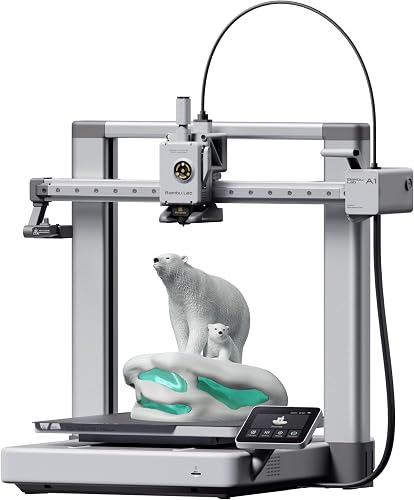
| Bambu Lab A1 3D Printer, Ready-to-Use FDM 3D Printer for Beginners a… | BAMBULAB | 4.6 | With an impressive acceleration of 10,000 mm/s², the A1 delivers blazing-fast printing while maintaining… |
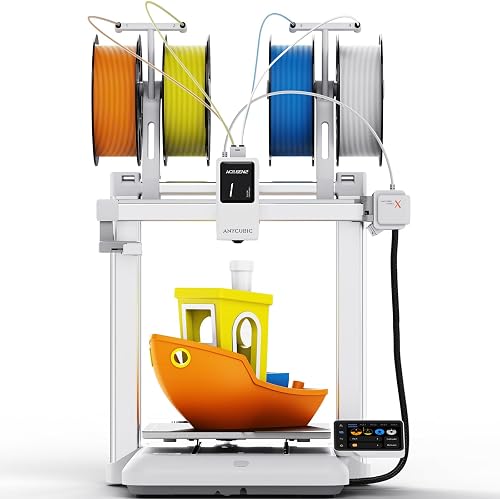
| ANYCUBIC Kobra X Fast 3D Printer, Native 4-Color & 19-Color Maximum… | ANYCUBIC | 4.6 | Features a large print size of 260mm x 260mm x 260mm; At just 45dB, the Kobra X is quieter than a normal conversation; Features LeviQ 3.0 with 49-point leveling at 0.02mm accuracy for perfect first layer adhesion |
How We Research
3d Printers Complete Site is a research and comparison site. Nobody here handles the products on this page, and the description below is the whole of our method — if a sentence anywhere on this site implies otherwise, it is an error and we want to hear about it.
What the comparison is built from. Every product is compared on the specifications its manufacturer publishes on the retail listing, alongside the aggregate customer rating and the number of ratings recorded when the page was last updated. Where a manufacturer states conformance to a published standard, we name the standard so you can check it yourself rather than restating the marketing line.
How products get onto the list. Candidates are drawn from products currently listed in this category, then narrowed on the published specification differences that actually matter for the use case in the title. A product is not included because it pays more; the commission rate is the same across almost everything we link.
What gets re-checked. Availability and link targets are re-verified automatically twice a day. Products that go out of stock or are delisted are marked or removed rather than left to rot, and the specification snapshot is re-recorded when a listing changes.
What we do not do. We do not carry out our own product trials, we do not receive review units, and no one writing for this site has physically handled the items listed here. Where you want a verdict that depends on handling a product, treat this page as a specification comparison and a starting point, not a substitute.
Final Verdict
The Neptune 4 Pro is the printer we recommend most often in 2026 to buyers with a $300 to $350 budget who want a real upgrade over entry-level machines. It is fast, mechanically solid, and runs proper Klipper firmware. The main weaknesses, fiddly Z-offset setup and weak stock part cooling, are solvable with a community fan duct print and patient calibration. Final rating: 4.4 out of 5.
If you can stretch budget to $400, the Bambu Lab A1 wins on out-of-box experience. If you need a fully enclosed chamber, look at the Creality K1. Otherwise, this is the budget high-speed pick.
Frequently Asked Questions
Does the Neptune 4 Pro come with Klipper firmware preinstalled? Yes. Elegoo ships a customized Klipper build out of the box, which is unusual at this price. You do not need to flash anything to access input shaping and pressure advance.
Can the Neptune 4 Pro print ABS and other high-temperature filaments? The hotend reaches 300 C and the bed reaches 110 C, so ABS and ASA are technically supported. However, the open frame means warping is likely without an enclosure. PETG and PLA-CF print well; ABS works but a DIY enclosure helps significantly.
What is the actual build volume in 2026? The Neptune 4 Pro has a 225 x 225 x 265 mm build volume, unchanged since launch. That is smaller than the regular Neptune 4 Plus (320 x 320 x 385 mm) but larger than the Neptune 4 base.
How does the auto bed leveling work? A strain-gauge sensor in the toolhead probes a 121-point mesh across the bed. The process takes about 8 minutes on first run. After the initial mesh, future prints reuse the saved data unless you trigger a manual re-level.
Is the Neptune 4 Pro louder than an Ender 3? It shouldn't be by much. The Neptune 4 Pro uses TMC2209 stepper drivers, which keep the motors effectively silent; on printers like this the part cooling fan is typically the loudest component. For exact noise levels at your desk, check recent owner reviews.
Does it support Wi-Fi printing? Yes. The onboard Wi-Fi connects to your home network and exposes a Fluidd-style web interface for remote print management, file uploads, and live monitoring. You can also use Klipper-compatible mobile apps.
Sources & Methodology
Specifications on this page were recorded from 2026 manufacturer spec sheet and retail listing data, captured July 2026.
Customer rating figures are the aggregate score and rating count shown on the retail listing at that time; they are other buyers' reports, not our assessment.
Independent references for this category. These are places to verify a category claim for yourself. We link them because they are authoritative, not to imply their tests were run on our behalf:
- ISO/ASTM 52900 — additive manufacturing terminology
- FTC Endorsement Guides — the disclosure rules this site is bound by
- CPSC recall database — check any product for open safety recalls
About the Author
The editorial team researches 3D printers using the manufacturer's published specifications and Amazon's official product data for each listing. We do not physically test, own, or use these printers, and we do not systematically read customer reviews — so we encourage you to check recent owner reviews for real-world reports before buying. We do not accept payment from manufacturers for favorable coverage. When a printer is revisited in a future model year, the write-up is updated with a visible last-updated date.
Key Takeaways
- Choosing the right elegoo neptune 4 pro review means matching the key features to your specific needs and budget
- Read real customer reviews and check the return policy before you commit
- Also covers: neptune 4 pro specs
- Also covers: elegoo neptune 4 pro print speed
- Also covers: neptune 4 pro vs ender 3
- Compare value across models — the priciest option is not always the best fit


