Disclosure: As an Amazon Associate we earn from qualifying purchases.
For the bambu lab x1c vs qidi q1 pro for asa outdoor signage decision in 2026, the short answer is this: both printers can produce warp-free ASA signs that survive years of sun and rain, but they win on different fronts. The Bambu Lab X1 Carbon delivers the most polished workflow, the best AMS-driven multicolor logo work, and a hardened ecosystem that small sign shops can scale on. The Qidi Q1 Pro counters with an actively heated 60°C chamber, a stiffer CoreXY frame for the price, and a refreshingly open slicer pipeline. If your signage business prints lots of letter-perfect single-color plaques and you want predictable layer adhesion in ASA, the Q1 Pro is the more obvious tool. If you want flawless two-tone branding, faster turnaround, and a deeper accessory catalog, the X1C is the safer long-term bet.
This guide walks through why ASA outdoor signage is uniquely demanding, how each printer addresses warping and UV-stable finishes, and which features actually translate into fewer failed signs.
When shopping for bambu lab x1c vs qidi q1 pro for asa outdoor signage, it pays to compare specs, capacity, and real-world runtime before committing.
Why ASA is the right filament for outdoor signage
ASA (acrylonitrile styrene acrylate) is the de facto outdoor 3D printing material because it keeps its color and impact resistance after thousands of hours of UV exposure. PLA fades and creeps in summer heat. PETG yellows. ABS holds up mechanically but is less UV-stable than ASA. For signage that will hang on a storefront, a real estate yard sign post, a marina dock, or a rural mailbox, ASA is the right call.
Head-to-head comparison
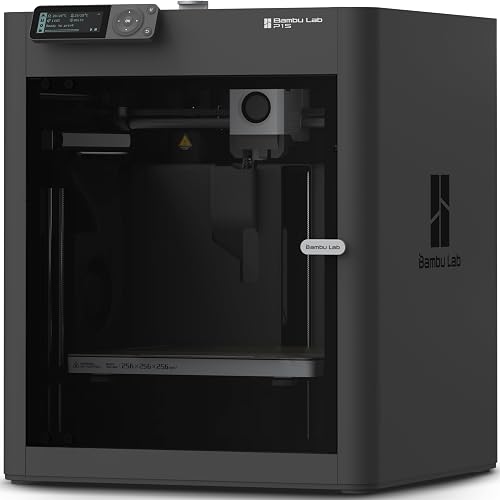
| Feature | Bambu Lab X1 Carbon | Qidi Q1 Pro |
|---|---|---|
| Build volume | 256 × 256 × 256 mm | 245 × 245 × 240 mm |
| Chamber | Passive, ~45-55°C at steady state | Active heating to 60°C |
| Max hotend | 300°C (hardened steel) | 350°C |
| Max bed | 120°C | 120°C |
| Motion system | CoreXY, carbon rails | CoreXY, full linear rails |
| Auto leveling | Lidar + load cell | Strain-gauge probe |
| Multicolor | AMS (up to 16 colors with multiple units) | None native; manual swaps only |
| Slicer | Bambu Studio (Orca-derived) | QidiStudio (Orca fork) |
| Firmware | Closed | Klipper, user-tunable |
| Filtration | Activated carbon | Activated carbon |
| Best fit for signage | Multicolor logos, fast turnaround, branded shops | Large warp-prone plaques, technical materials, tinkerers |
The trade-off is that ASA is a styrene-based filament with a glass transition around 100°C and a meaningful tendency to warp during printing. It releases styrene fumes, prints best in a hot chamber, and demands a strong first layer. That is the lens through which we should compare the bambu lab x1c vs qidi q1 pro for asa outdoor signage: enclosure quality, chamber temperature, bed adhesion, and reliability per print hour matter more than headline speed numbers.
Bambu Lab X1 Carbon at a glance
The X1 Carbon is Bambu Lab's flagship CoreXY printer. It pairs a fully enclosed build chamber with a hardened steel hotend, dual auto bed leveling (lidar and load cell), the AMS multimaterial unit, and a refined slicer that has become the industry yardstick for click-to-print convenience. For ASA, the relevant strengths are the passive enclosure that easily holds 45-55°C during a long print, the heated bed that reaches 110°C+, and the carbon-fiber-reinforced rails that keep ringing low even at aggressive speeds. The X1C does not have an actively heated chamber, but real-world sign printers report that the passive heat plus a hot bed is enough for ASA plaques up to roughly 200×200 mm without splitting.
Qidi Q1 Pro at a glance
The Q1 Pro is Qidi's answer to the X1C and it leans hard into engineering-material printing. The headline feature for outdoor signage is the actively heated chamber, advertised to 60°C, which dramatically reduces warping on tall ASA prints and large flat plaques. Add a Klipper-based controller, linear rails on all axes, a 350°C hotend, a PEI flex plate, and an open-source-friendly slicer story, and you have a printer that is built specifically for the materials that drive outdoor signage shops, including ASA, PC, PA-CF, and PET-CF.
Enclosure and chamber: the single biggest factor for ASA signs
If you only optimize one thing for ASA, optimize chamber temperature stability. ASA warps because the bottom layers cool and contract while upper layers are still molten. A 60°C chamber slows that cooling, keeping the print in the rubbery zone long enough to relieve stress. The Qidi Q1 Pro is one of the few sub-$1000 printers with an active heater for the chamber, and in practice that means you can print a 230 mm-wide ASA real estate sign with a 1 mm brim and pull it off the plate intact.
The X1C's passive chamber is excellent for small to medium ASA signs. A 150 mm house number plaque, a mailbox flag, or a stacked HOA badge will print fine with a brim and a 105°C bed. Where the X1C strains is the long, thin signage shape, like a 240 mm street name plate where the long edges have nothing to anchor them. Many shop owners solve that with a draft shield or a textile cover over the top vent, but out of the box the Q1 Pro has the edge.
Print quality at signage-relevant settings
Outdoor signs care about three things at the surface: clean text edges, no layer splitting on tall letters, and crisp logo color separation. The X1C wins on text quality, partly because of its excellent input shaping calibration and partly because Bambu Studio's defaults are tuned conservatively. Letterforms at 0.16 mm layer height come off the X1C looking like injection-molded signage. The Q1 Pro can match that quality, but expect to tune pressure advance and acceleration before you ship to a customer.
Both printers can hit 300-500 mm/s on travel and 200-300 mm/s on outer walls without losing dimensional accuracy in ASA, although you should drop speeds for visible faces. Realistic sign-shop print times: a 200 mm two-color address plaque takes about 6 hours on the X1C with AMS, versus 5 hours plus a 30-second manual swap on the Q1 Pro.
Multicolor for branded signage
This is the largest functional gap between the two printers. The AMS unit on the X1C is the single feature that justifies its price for any shop selling branded signs. Two-tone real estate logos, three-color HOA emblems, sponsor plaques, and contrast-fill house numbers all become trivial. The Q1 Pro has no native multicolor system in 2026, so any color separation has to be done by pausing the print, swapping filament, and resuming. That is workable for a hobbyist, but it kills you on volume.
If multicolor matters, the decision is essentially made for you. Read the Bambu Lab X1 Carbon review for a deeper look at how the AMS handles ASA specifically, including the humidity-control tray that keeps the filament dry during long signage runs.
Reliability and uptime
Outdoor signage shops live and die by uptime. The X1C has three years of mature firmware and an enormous user base, which means most failure modes are documented and serviceable in under an hour. The Q1 Pro is newer and the community is smaller, but Klipper underneath means you can actually fix it. If you are running a one-printer shop and need maximum reliability with minimum troubleshooting, the X1C is the safer pick. If you have a small farm and the freedom to tune, the Q1 Pro is more flexible.
For broader context on how each printer fits in the enclosed CoreXY category, our best enclosed 3D printers guide ranks both alongside their direct competition.
Operating cost
ASA filament runs $25-$35 per kilogram for the UV-stable, color-true brands you want for paying customers. A 200 mm address plaque uses around 120 g of ASA. Power draw is roughly 150W average on the X1C and 220W average on the Q1 Pro thanks to the chamber heater. Over a year of moderate signage volume, the Q1 Pro's chamber heating will cost a few extra dollars in electricity, which is irrelevant compared to a single failed reprint.
Workflow and slicer ergonomics
Bambu Studio remains the cleanest slicer in 2026 for production sign work. Profiles for ASA are well tested, the cloud preview is fast, and the camera in the X1C lets you spot a corner lifting before it ruins a 6-hour print. QidiStudio is an Orca fork that exposes more knobs, which is a feature if you are tuning for PC blends or PA-CF, but a small distraction if you just want to ship plaques. Both are free.
Picks
Best overall for a signage shop: Bambu Lab X1 Carbon
If your business is making branded signs, the X1C is the right tool. The AMS unlocks multicolor logos, the camera lets you babysit prints remotely, and the passive enclosure is more than enough for the vast majority of sign sizes. Pair it with a textured PEI plate, run ASA at 260°C with a 105°C bed and a 5 mm brim, and you will have a production-ready setup the day it arrives.
Best for large warp-prone signs and technical materials: Qidi Q1 Pro
If your typical job is a single-color 240 mm street sign, an HOA covenant plaque, or a marina mooring tag in PC-blend, the active chamber heater on the Q1 Pro is genuinely useful. You give up multicolor and a mature ecosystem, but you gain a printer that simply will not warp on the prints that historically warp the most. It is also the better entry point if you want to expand into PC, nylon, or carbon-fiber-reinforced filaments down the road.
Best companion choice: Bambu Lab P1S
For shops that want X1C-class reliability without the X1C price, the P1S is worth considering as a second printer. It is enclosed, AMS-compatible, and runs ASA acceptably for medium signs. Our Bambu Lab P1S review covers the trade-offs in detail. Many sign shops run one X1C for color work and a P1S as the production workhorse.
Frequently Asked Questions
Can the Bambu Lab X1C really print ASA without an active chamber heater for outdoor signs?
Yes, for most signage sizes. The X1C's passive enclosure stabilizes at roughly 45-55°C during a long print, and combined with a 105-110°C bed and a 5 mm brim, ASA prints up to about 200 mm in the longest dimension come off the plate without warping. For larger plaques, add a draft shield in the slicer, lower fan speed on the bottom 5 mm, and keep the front door closed. The active 60°C chamber on the Q1 Pro is a clear advantage for prints above that size class.
How long will an ASA 3D-printed outdoor sign last in direct sun?
Real-world reports from sign makers in 2026 put well-printed ASA signage at 5-10 years of usable life in full sun before noticeable color fade, with mechanical integrity well beyond that. UV-stabilized ASA brands hold their color longest. Mounting orientation matters: a sign that drains water and is not in standing snow will outlast one that is. Sealing the print with a satin clear coat extends life further, but it is not strictly required.
What is the best bed adhesion strategy for ASA on either printer?
Use a textured PEI plate at 105-110°C for the first layer, then drop to 100°C. Apply a thin layer of glue stick or use a fresh, oil-free plate. Run a 5 mm brim on any sign over 100 mm in the longest dimension. Disable the parts cooling fan for the first 3-5 layers, then run it at no more than 20-30% on interior layers. Both the X1C and Q1 Pro have ASA profiles that get most of this right by default.
Do I need an enclosed printer to print ASA signage safely?
Practically, yes. ASA emits styrene fumes that you should not breathe over long sessions, and the print quality benefits from a warm, draft-free chamber. Both printers in this comparison are fully enclosed and include activated-carbon filtration, which is the right baseline for printing ASA in a small shop or garage. Open-frame printers can print ASA but will warp on anything larger than a coaster and should be vented to outside air.
Is the Qidi Q1 Pro's 60°C chamber actually necessary for ASA?
Necessary, no. Useful, yes, especially as parts get larger. For coasters, badges, and small house numbers, a passive enclosure is plenty. For 200 mm+ flat plaques, long street signs, or thin sweep shapes that have no anchoring geometry, the 60°C heated chamber meaningfully reduces warping and layer splitting. Think of it as buying insurance against expensive reprints rather than a daily-use feature.
Which printer is easier to keep running in a small business setting?
The X1C, by a clear margin in 2026. Its ecosystem is larger, the failure modes are widely documented, replacement parts ship quickly, and the cloud workflow handles farms gracefully. The Q1 Pro is reliable in absolute terms but its smaller community means longer troubleshooting times when something goes wrong. For first-time owners running a one-printer signage shop, the X1C is the lower-risk choice. Our 3D printer buying guide goes deeper on choosing for a business context.
Can I print full-color signs on the Q1 Pro?
Only with manual filament swaps mid-print. The Q1 Pro does not ship with a native multimaterial system in 2026, so any color separation is a pause-swap-resume operation. It works for two-color address plaques if you are patient, but it does not scale. If color matters to your business, the X1C with AMS is the correct tool.
What other filaments should a signage printer support?
Beyond ASA, the most useful materials for outdoor work are PETG (for translucent backlit signs), PC blends (for impact-resistant safety signage), and TPU (for flexible cable strain reliefs on mounted signs). The X1C handles all of these well below 300°C. The Q1 Pro's 350°C hotend additionally opens up PA-CF and PET-CF for structural sign brackets and outdoor stake feet, which is a real advantage for shops planning to expand product lines.
Key Takeaways
- Choosing the right bambu lab x1c vs qidi q1 pro for asa outdoor signage means matching the key features to your specific needs and budget
- Read real customer reviews and check the return policy before you commit
- Also covers: asa outdoor sign 3d printer
- Also covers: x1c vs qidi q1 pro asa
- Also covers: uv resistant signage printer comparison
- Compare value across models — the priciest option is not always the best fit