Disclosure: As an Amazon Associate we earn from qualifying purchases.
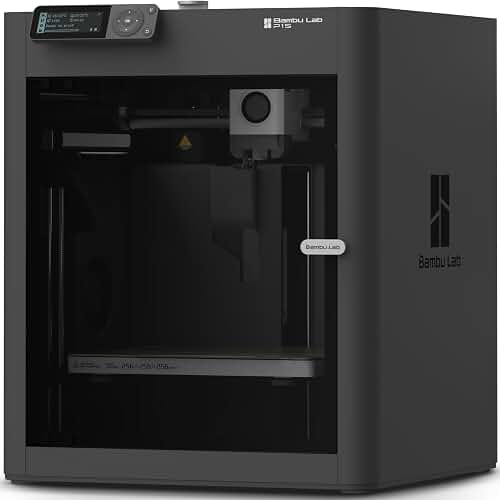
To print cosplay helmet on bambu p1s, split your model into pieces that fit the 256×256×256 mm build volume, orient each section for minimal supports, use a 0.4 mm nozzle with 0.2 mm layers, and bond the parts with cyanoacrylate or epoxy before sanding and painting. The P1S enclosure stabilizes chamber temperature for clean PETG and ABS prints — both popular cosplay materials — and its CoreXY motion system can churn out a full Mandalorian, Master Chief, or Iron Man helmet over a long weekend instead of a full week.
This guide walks through every stage in 2026 terms: choosing a helmet model, splitting it correctly, picking filament, dialing in slicer profiles, mastering supports, and finishing a printed helmet so it looks screen-accurate rather than DIY.
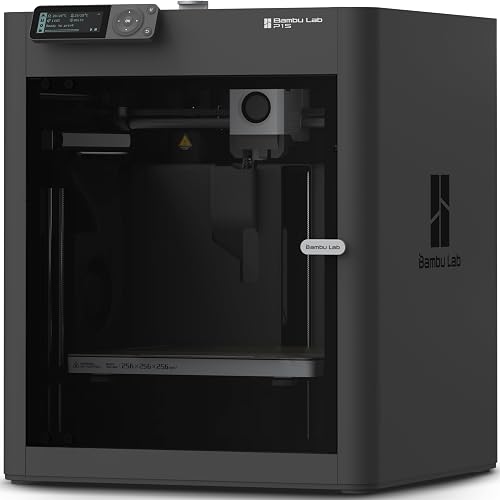
Why the Bambu Lab P1S works so well for helmet builds
The P1S sits in a sweet spot for prop-makers. It is fast enough that you can iterate on test fits, enclosed enough to handle ABS and ASA without warping, and priced for hobbyists rather than studios. Its AMS support lets you do multi-color accents — a gold visor frame, red detail lines — without swapping filament mid-print. For a thorough breakdown of the machine itself, see our Bambu Lab P1S review.
Compared with an open-frame i3-style printer, the heated chamber holds layer adhesion together on tall, thin helmet sections like Iron Man faceplates or stormtrooper ear pieces. Compared with a 300 mm class Creality or Anycubic, the P1S build volume is smaller — but most cosplay helmets split into 4–8 chunks anyway, so the speed and chamber advantage usually outweigh the bigger bed.
Sizing up your helmet — the 256 mm question
The P1S build volume is 256×256×256 mm. The average adult head circumference is around 56–58 cm, with a front-to-back diameter near 195–205 mm and a typical helmet height of 250–290 mm depending on style. That means:
- A clean-shell helmet like Boba Fett or a stormtrooper will not fit as one piece — the height alone exceeds 256 mm once you account for the dome and chin guard.
- An Iron Man Mark 50 split into faceplate and skull can usually print in two halves diagonally, but most builders go to 3–4 pieces for cleaner orientation.
- Large pauldron-style helmets (Halo ODST, Destiny Titans) almost always need 4–6 pieces because of the wide ear flares.
If you want a true one-piece helmet print, you need a larger machine — our roundup of the best large format 3D printers covers options with 300 mm or 400 mm cubed envelopes. For everyone else, splitting is the standard workflow and the workflow this guide focuses on.
Splitting a helmet model for the P1S
Most cosplay STL files from Etsy, MyMiniFactory, or Cults3D come pre-split for roughly 250 mm class printers, but many do not. You will often need to slice the mesh yourself in Bambu Studio, PrusaSlicer, or Blender.
Using Bambu Studio's cut tool
Inside Bambu Studio, select the helmet, hit the cut icon, and drag the cutting plane to bisect at logical seam lines: jaw line, brow line, helmet midline. Enable "Keep upper" and "Keep lower," then add connectors — Bambu Studio can auto-place dovetail or pin-style alignment keys directly into the slice. This means your printed pieces snap together like Lego before you glue them, which makes alignment for sanding far easier.
Adding alignment keys
If you split in Blender, add 4–6 mm cylindrical pegs to one face of the cut and matching holes on the opposite face, offset by 0.2 mm for clearance. These keep the seams aligned during epoxy cure. A seamless join is the single biggest visual upgrade you can make to a printed helmet, and proper keys do most of the work for you.
Best filaments for cosplay helmets on the P1S
The filament choice drives everything downstream: print success, sanding effort, paint compatibility, and durability at conventions.
PLA and PLA+
PLA prints flawlessly on the P1S, sands well with progressive grits (220 400 800), and accepts filler primer easily. Its weakness is heat — a PLA helmet left in a hot car can warp out of shape. PLA+ blends from eSun or Polymaker improve impact resistance but still soften around 55 °C. For a deeper primer on why PLA is the default for beginners, see our PLA filament guide. PLA is the right pick for indoor conventions, photoshoots, and display.
PETG
PETG is the cosplay workhorse on the P1S because the enclosure keeps it from over-cooling and stringing. It is stronger than PLA, handles 75 °C heat, and bonds well with PETG-specific adhesives. The downside is sanding — PETG gums up sandpaper unless you wet-sand, and the slightly glossy surface shows imperfections under primer.
ABS and ASA
The P1S enclosure unlocks reliable ABS and ASA printing — something open-frame machines fight constantly. Both are heat-resistant (95 °C+), easy to vapor-smooth with acetone (ABS), and rigid enough that thin elements like Mandalorian antennae do not snap. The catch is fumes: print ABS only with the door closed, the carbon filter installed, and the room ventilated.
Recommended slicer settings for helmet sections
You can print cosplay helmet on bambu p1s with Bambu Studio's stock 0.2 mm "Standard" profile and the result will be perfectly serviceable. But the following tweaks give noticeably better cosmetic results:
- Layer height: 0.20 mm is the sweet spot. 0.16 mm gives smoother curves but doubles print time; 0.28 mm is fast but layer lines show through primer.
- Walls: 3 walls minimum, 4 walls for impact-prone pieces like faceplates. Helmets take knocks at conventions.
- Top/bottom layers: 5 top, 4 bottom. This avoids pinholes that primer cannot hide.
- Infill: 10–15% gyroid. Helmets are not load-bearing — high infill just adds weight and print time.
- Outer wall speed: 150–200 mm/s for PLA, 80 mm/s for PETG, 60 mm/s for ABS. The P1S can run faster, but slower outer walls reduce ringing on round helmet surfaces.
- Ironing: turn off for helmets — you will sand the surface anyway, so the extra time is wasted.
Supports, orientation, and minimizing print time
Orientation is where most cosplay prints succeed or fail. The general rules:
- Place each piece so the visible outer surface faces upward or outward, never against support material. Support scarring is the number-one cause of ugly cosplay prints.
- Use tree supports for organic shapes — they peel off cleanly and use less filament than grid supports.
- For faceplates, print mouth-side down with the back of the helmet flat on the bed. The outer face is then support-free.
- For dome pieces, slice horizontally at the brow line so the top half prints as a half-sphere on its flat cut — almost zero supports needed.
If you are still weighing the P1S against other enclosed machines for this kind of work, our best enclosed 3D printers roundup compares chamber temperature, build volume, and filament compatibility across the major options in 2026.
Bonding, sanding, and finishing
Once your pieces come off the bed, the cosplay work begins. A clean glue-up is everything.
Bonding: Cyanoacrylate (CA) glue with activator gives a fast, strong bond for PLA and PETG. For ABS, two-part epoxy or ABS slurry (acetone plus ABS scraps) gives a chemically welded joint. Apply glue, press parts together using your alignment keys, and hold for 30 seconds. Reinforce the inside seam with fiberglass cloth and resin if the helmet will see heavy use.
Filling layer lines: Apply 2–3 coats of filler primer (Rust-Oleum Filler Primer is the standard, Bondo Spot Putty for deeper gaps), letting each coat fully dry. Wet-sand at 220 grit, then 400, then 800. The goal is a glassy surface before paint.
Painting: Automotive rattle cans give the best finish. Lay down 2–3 light coats of base color, let cure overnight, then add weathering with acrylic washes and dry-brushing. Seal with matte or satin clear coat depending on the character — Mandalorian armor is satin, Iron Man is gloss, ODST is matte.
Interior padding: Glue 5 mm EVA foam strips inside the helmet for comfort and a snug fit. A helmet that wobbles ruins photos.
Frequently Asked Questions
How long does it take to 3D print a full cosplay helmet on a Bambu Lab P1S?
For an average-sized helmet split into 4–6 pieces at 0.2 mm layers and 15% infill, total print time on the P1S runs 35–55 hours depending on geometry. A simple stormtrooper hits the low end; a detailed Halo Master Chief with separate visor frame, ear caps, and chin guard hits the high end. Plan on a long weekend of printing plus another week of finishing.
Can the P1S print ABS for cosplay helmets safely?
Yes — the P1S is one of the few sub-$1000 enclosed printers that handles ABS reliably in 2026. Use a sealed dry-box feed, set the bed to 100 °C and the nozzle to 250 °C, close the chamber door, and run the carbon filter. Print in a ventilated room because ABS fumes (styrene) are unpleasant and not something to inhale long-term.
What is the largest helmet I can print in one piece on a P1S?
The 256×256×256 mm volume fits diagonal helmets up to about 360 mm corner-to-corner if you tilt them, but realistic single-piece cosplay helmets max out around an average-size stormtrooper shell without the chin section. Most helmets are split, both for fit and for support-free surfaces.
Do I need to use ABS, or can PLA work for cons?
PLA works for the vast majority of cosplay scenarios — most builders use it. The only times PLA fails are outdoor summer conventions where direct sunlight pushes interior helmet temps past 55 °C, or if you plan to leave the helmet in a car. For those cases, switch to PETG or ABS.
How do I hide the seams where the printed pieces join?
After gluing the pieces with alignment keys, apply Bondo Spot Putty to the seam, let it cure for an hour, then wet-sand at 220 grit. Follow with filler primer and 400-grit wet sanding. Most seams disappear completely after two rounds of putty-and-sand. Inside the helmet, reinforce the joint with fiberglass cloth and resin.
Can I print a helmet visor on the P1S?
You can print the visor frame on the P1S, but the transparent lens itself should be vacuum-formed from PETG sheet or cut from tinted polycarbonate. FDM prints are not optically clear. The standard cosplay workflow is to print the helmet shell with a visor cutout, then mount a tinted polycarbonate insert behind the frame.
What is the best beginner-friendly cosplay helmet to start with on a P1S?
A clone trooper or stormtrooper helmet. Both have simple, large panels with shallow curves, minimal undercut details, and forgiving symmetry. The pieces fit the P1S build volume comfortably and the bright white surface hides minor imperfections. Iron Man and Mandalorian helmets are more popular but involve mechanical details, multi-color elements, and tighter tolerances that are harder for first builds.
Key Takeaways
- Choosing the right print cosplay helmet on bambu p1s means matching the key features to your specific needs and budget
- Read real customer reviews and check the return policy before you commit
- Also covers: bambu p1s cosplay
- Also covers: large prints on p1s
- Also covers: split model for p1s
- Compare value across models — the priciest option is not always the best fit