Disclosure: As an Amazon Associate we earn from qualifying purchases.
The best 3d printer for classroom use in an elementary school is one that prioritizes safety, simple one-tap operation, quiet motors, and a fully enclosed or shrouded hot end so curious K-5 hands stay away from anything hot. For most elementary classrooms in 2026, that means a small-footprint FDM printer with auto bed leveling, a touchscreen, PLA-only printing (no fumes), and a build volume around 180-250 mm cubed. You do not need a $2,000 industrial workhorse to teach design thinking — you need a reliable, kid-friendly machine that a teacher can start in 60 seconds between morning meeting and math block.
This guide walks through exactly what to look for, what to avoid, how to fit a printer into a real elementary budget, and how to roll one into a 3rd, 4th, or 5th-grade STEAM rotation without it eating your prep period. We will not push you toward any single model — instead, you will leave knowing which specs matter for ten-year-olds, which marketing claims do not, and how to write a purchase proposal your principal will actually sign.
What Makes a 3D Printer Right for an Elementary Classroom
Elementary classrooms have a unique set of constraints that home users and even high school makerspaces do not face. Children ages 5-11 are shorter, more curious, and far more likely to touch a nozzle the second your back is turned. Custodial staff move furniture nightly. Outlets are limited. The HVAC may be loud, but recess transitions are louder, and a screaming printer fan during read-aloud is a real problem. The best 3d printer for classroom use solves for all of this — not just print quality.
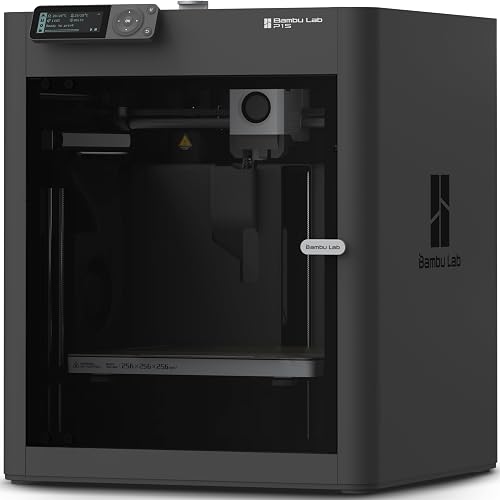
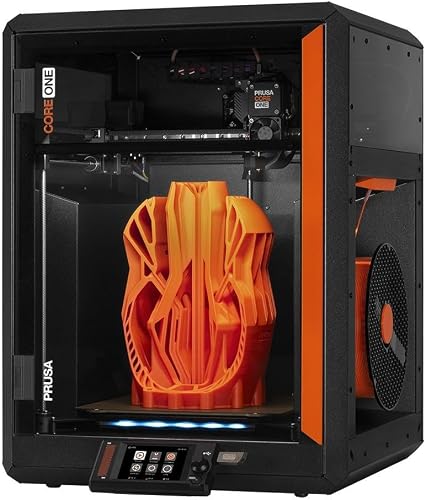
The four pillars that separate a great classroom printer from a frustrating one are: physical safety, operational simplicity, acoustic profile, and total cost of ownership. Build volume, top speed, and exotic filament compatibility are nice on a spec sheet but rarely matter for elementary projects, which are typically keychains, name tags, simple geometric solids, animal figurines, and small math manipulatives.
Physical Safety Above Everything
The nozzle on a standard FDM printer reaches 200-220°C — hot enough to cause a serious burn instantly. The heated bed sits at 50-65°C, hot enough to be uncomfortable but not dangerous. Look for printers with a shrouded or recessed hot end, a sturdy frame that will not tip when a backpack swings into it, and ideally a full acrylic or polycarbonate enclosure. Enclosures add cost but they also muffle sound, contain stray filament strands, and put a literal barrier between fingers and heat.
If you cannot afford a factory-enclosed printer, you can buy or fabricate an aftermarket enclosure for under $80, or simply place the printer on a cart with a clear plastic shield zip-tied around it. For more on this category, see our roundup of the best enclosed 3D printers — several models there scale down nicely to elementary use.
One-Tap Operation
Teachers do not have time to babysit a slicer. The ideal classroom printer accepts a sliced file from a USB stick or Wi-Fi upload, asks one confirmation question on a color touchscreen, and starts printing. Auto bed leveling is non-negotiable in 2026 — no teacher should be turning Z-offset knobs while 24 second graders wait. Look for the phrase "automatic mesh leveling" or "LiDAR calibration" on the spec sheet.
Filament loading should be a single button press with a guided prompt. Bed adhesion should come from a flexible PEI or textured spring steel sheet that pops prints off when bent — not a glue stick, not painter's tape, and absolutely not hairspray.
Quiet Operation
A printer running at 50+ decibels will derail any read-aloud, silent reading, or test. The quietest modern printers use silent stepper drivers (TMC2209 or newer) and hover around 45 dB during normal printing — about the volume of a refrigerator. Loud printers can hit 60+ dB and sound like a small drone. Always check the manufacturer's published noise spec, and read teacher reviews specifically, not maker-hobbyist reviews.
Key Features to Prioritize for K-5
Here are the specs that actually matter when shortlisting the best 3d printer for classroom rotations, in priority order.
Build volume: 180×180×180 mm to 256×256×256 mm is the sweet spot. Smaller than that and you cannot print a whole class set in one overnight job; larger than that and the machine takes up too much desk space and prints take too long for a single class period.
Print speed: Modern Core-XY and well-tuned bedslinger printers can hit 300-500 mm/s. For classroom use, anything that comfortably prints a 30 mm calibration cube in under 25 minutes will work. You want speed because elementary students lose interest fast — seeing a print finish in one class period is magical; waiting three days is not.
Materials: PLA only. Period. PLA is corn-based, prints without significant fumes, and is the only material the EPA and most school district policies tolerate in an unventilated classroom. Avoid ABS, ASA, polycarbonate, and nylon entirely — they release styrene and other compounds you do not want children inhaling. For background on the material, our guide to PLA filament covers the basics teachers need to know.
Connectivity: Wi-Fi with a mobile app is ideal so teachers can queue a print from their phone during lunch. USB stick and SD card slots are good fallbacks. Avoid printers that require a wired computer connection — laptops get unplugged, profiles disappear, and the next teacher inherits chaos.
Camera: A built-in camera lets you check on prints from your phone, save time-lapses to share with parents, and detect failed prints before they waste a full spool. Not essential, but increasingly common at the $400-700 price point.
Budget Realities for Elementary Schools
Most elementary classroom printers are funded through PTA grants, DonorsChoose campaigns, district STEM budgets, or one-time Title IV allocations. Realistic budget tiers in 2026 look like this:
$200-350: Entry-level enclosed or semi-enclosed FDM. Expect a small build volume around 180 mm, single-color PLA only, auto leveling, decent touchscreen. Perfect for a single classroom that prints once or twice a week.
$400-700: Mid-range Core-XY or high-speed bedslinger. Full enclosure, automatic calibration, built-in camera, app control, and noticeably faster print times. The sweet spot for a school that wants one printer rotating across multiple grade levels.
$800-1500: Premium classroom printers, often including multi-color upgrades, larger build volumes, and superior dust filtration. Justifiable for a dedicated school makerspace serving every grade.
For a deeper breakdown across price points, our 3D printer budget guide is a good companion read before writing your purchase order. And if you are completely new to the category, the best 3D printers for beginners roundup covers many of the same models that work well in K-5 settings.
Setting Up Your First Classroom Printer
Once your printer arrives, plan for a 90-minute setup window before any students see it. Unbox on a flat, sturdy cart at least 30 inches off the ground — kids should be able to watch the build plate at eye level but not reach over it. Place the cart against a wall to limit access to three sides, and put the touchscreen on the side facing the teacher's desk.
Run the manufacturer's built-in calibration routine, then print the included test model. This first print is just for you to confirm the machine works; do not show it to the class yet. Once you have a clean test print in hand, take a photo, share it on the first day, and let the unveiling be a special moment.
For step-by-step help with that initial setup, the how to set up your first 3D printer walkthrough covers everything from leveling to your first slicer profile. Keep a copy of the maintenance schedule near the printer — our maintenance guide outlines the monthly nozzle cleaning, belt-tension check, and lubrication routine that keeps a classroom printer running for years instead of months.
Curriculum Integration Ideas That Actually Work
The biggest mistake elementary teachers make is treating the printer as the lesson. The printer is a tool, like a stapler or a glue gun. The lesson is the design thinking that happens before the print starts.
Kindergarten and 1st grade: Print pre-made models of community helpers, simple animals, or alphabet blocks. Students manipulate physical objects to support storytelling, sorting, and counting. They do not design — they observe and use.
2nd and 3rd grade: Introduce Tinkercad on Chromebooks. Students design name tags, keychains, and simple ornaments. Each child gets one print per quarter — limit scope ruthlessly or you will print 24 hours a day.
4th and 5th grade: Move into measurement, geometry, and simple engineering. Students design a phone stand to specific dimensions, a bridge for a structural challenge, or a custom math manipulative. Tie every project to a standard. Document everything with student-written design journals.
What to Avoid in a Classroom Printer
Skip any printer marketed as "DIY," "open-frame for tinkerers," or "maximum customization." You do not want to tinker — you want to teach. Skip resin printers entirely; the photopolymer chemistry and required ventilation are inappropriate for elementary settings. Skip multi-material printers unless you have a dedicated technician — the failure modes are confusing and waste filament.
Avoid printers with proprietary filament cartridges that lock you into one supplier at 3x market price. Open-spool PLA from any major brand should just work.
Frequently Asked Questions
What is the safest 3D printer for an elementary school classroom?
The safest classroom printers are fully enclosed FDM machines with shrouded hot ends, auto-pause-on-door-open features, and PLA-only printing. Enclosures contain heat, muffle noise, and physically separate moving parts from small hands. Place the printer on a cart against a wall to further limit access, and never run a print unattended during the school day.
How much should an elementary school budget for a classroom 3D printer?
Plan for $400-700 for the printer itself plus $150-250 for the first year of consumables — PLA spools, replacement nozzles, a glue stick or two, and a basic tool kit. Budget another $50-100 annually for ongoing filament. Avoid printers under $200; the time you lose to failed prints is worth more than the money you save.
Can elementary students operate a 3D printer themselves?
Fifth graders can absolutely load filament, start a print from a pre-sliced file, and remove a finished print under supervision. Third and fourth graders can do supervised file selection and removal. Below third grade, the teacher should operate the printer while students observe and design. Always treat the hot end as a no-touch zone regardless of grade.
What is the best 3D printer for teaching STEM in K-5?
The best classroom 3D printer for K-5 STEM teaching is an enclosed, Wi-Fi-enabled FDM printer in the $400-700 range with auto bed leveling, a built-in camera, and a 220×220 mm or larger build plate. Brands with strong school-support programs and online lesson libraries add significant value beyond the hardware itself.
How long does a typical classroom print take?
A 30 mm keychain prints in 20-40 minutes on a modern fast printer. A small figurine or name tag runs 45-90 minutes. A full class set of 24 small items typically takes 6-12 hours, which is why most teachers print overnight or queue jobs during specials. If you need answers about throughput before purchasing, our high-speed 3D printer roundup compares real-world print times across modern models.
Do I need ventilation for a classroom 3D printer?
PLA produces minimal fumes and is considered safe for typical classroom ventilation. You do not need a dedicated exhaust hood. However, you should never run printers in a closed closet or storage room, and you should never print ABS, ASA, nylon, or polycarbonate in an elementary classroom under any circumstances.
How do I teach 3D design to students who have never used CAD?
Start with Tinkercad — it is free, runs in any browser, and is specifically designed for ages 8 and up. Teach in 15-minute mini-lessons over two weeks before letting students design their first printable object. Focus on dragging primitive shapes, grouping, and aligning rather than precise dimensioning. Save precise measurement work for fourth and fifth grade.
Key Takeaways
- Choosing the right best 3d printer for classroom means matching the key features to your specific needs and budget
- Read real customer reviews and check the return policy before you commit
- Also covers: 3d printer for schools
- Also covers: safe 3d printer for kids
- Also covers: education 3d printer
- Compare value across models — the priciest option is not always the best fit