Disclosure: As an Amazon Associate we earn from qualifying purchases.
Printing carbon fiber reinforced nylon is one of the most demanding jobs in desktop 3D printing, and choosing the best 3d printer for carbon fiber nylon comes down to a handful of non-negotiable features: a hardened steel or ruby-tipped nozzle, an all-metal hotend that can sustain 280-300 degC, an actively or passively enclosed build chamber, a heated bed that reaches at least 100 degC, and a workflow that keeps filament dry through long prints. Nail those, and you can produce jigs, fixtures, drone frames, structural brackets, and even end-use parts that approach the stiffness and heat resistance of injection-molded engineering plastics. This 2026 buyer's guide breaks down exactly what to look for, which trade-offs matter, and how to match a machine to the parts you actually want to make.
Why Carbon Fiber Nylon Is So Demanding
Carbon fiber reinforced nylon (often labeled PA-CF, PAHT-CF, or Nylon-CF) is essentially a high-performance polyamide with chopped carbon fibers blended into the pellets before extrusion. The fibers boost stiffness, heat deflection temperature, and dimensional stability, but they also make the filament aggressively abrasive and extremely sensitive to moisture. A standard brass nozzle will erode in 50-100 print hours, the nylon matrix will absorb water from ambient air in under 24 hours, and the part will warp violently off a cool bed in a drafty room. The best 3d printer for carbon fiber nylon is therefore not the fastest or the cheapest machine on your shortlist; it is the one engineered end-to-end for high-temperature, low-humidity, abrasion-heavy printing.
When shopping for best 3d printer for carbon fiber nylon, it pays to compare specs, capacity, and real-world runtime before committing.
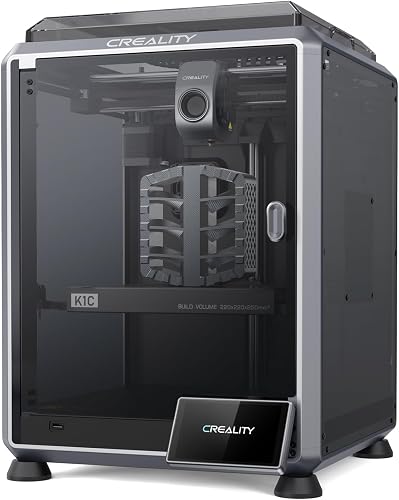
Compared to PLA or PETG, expect roughly twice the nozzle temperature ceiling requirement, a meaningful chamber temperature target (45-55 degC ambient is ideal), and a much stricter filament storage routine. If a printer cannot tick all three boxes, parts will either warp, delaminate, or print fuzzy as the fibers expose themselves at the surface.
The Five Specs That Actually Matter
1. Hardened, High-Flow Hotend
A brass nozzle is a non-starter. You want hardened steel, tungsten carbide, or ruby-tipped nozzles in a 0.4 mm or 0.6 mm diameter. The hotend itself should be fully metal (no PTFE liner anywhere near the melt zone) and rated to at least 300 degC continuous. A 0.6 mm nozzle is the sweet spot for CF nylon: it clogs far less often than 0.4 mm, prints noticeably faster, and produces stronger parts because layer adhesion improves with thicker extrusions. High-flow throat designs (CHT, bi-metal, or volcano-style) help maintain melt rate when you push speeds past 100 mm/s.
2. Enclosed Build Chamber
Nylon shrinks as it cools, and CF nylon shrinks unevenly because of the fiber orientation. Without an enclosure, the bottom layers cool while the top layers are still hot, and the part curls off the bed or splits between layers. A proper enclosure traps heat from the bed and hotend so the chamber sits around 45-55 degC during a print, which dramatically improves layer adhesion and dimensional accuracy. Active heating is even better, but a sealed, insulated enclosure is the minimum bar. For more options here, see our roundup of the best enclosed 3D printers.
3. High-Temperature Bed and Surface
Carbon fiber nylon adheres reliably to a heated bed at 90-110 degC, but the surface chemistry matters as much as the temperature. PEI (smooth or textured) works once you apply a thin coat of glue stick or a dedicated nylon adhesive, while Garolite (G10) sheets are the gold standard because nylon bonds to it mechanically without any release agent. A flexible spring-steel build plate makes part removal painless after the bed cools.
4. Filament Drying and Feeding
This is the single biggest reason people get bad CF nylon prints. Nylon is hygroscopic and will absorb enough moisture from a humid room in 4-8 hours to ruin a print: you will hear popping, see steam at the nozzle, and watch layers come out rough and weak. The best machines either include an active heated drybox, support an enclosed AMS-style spool chamber with desiccant, or let you feed filament directly from a dedicated dryer like a SUNLU S2 or PrintDry. If you are buying a printer specifically for CF nylon, budget for a filament dryer too, no exceptions.
5. Rigid Motion System
CF nylon parts often demand high infill, thick walls, and long print times. A rigid frame, linear rails, and a CoreXY or input-shaped Cartesian motion system will hold tolerances over 20-40 hour prints far better than a wobbly bedslinger. Closed-loop steppers or input shaping let you keep speeds reasonable without introducing ringing on flat surfaces, which is especially noticeable on the matte finish CF nylon naturally produces.
Which Class of Printer Should You Buy?
Entry-Level: Upgraded Open-Frame Bedslingers
If your budget is under $400, you will not find a turnkey CF nylon machine. What you can do is buy a capable open-frame printer with an all-metal hotend (or upgrade path to one), add a third-party hardened nozzle, build a DIY enclosure from an IKEA Lack table, and run filament out of a sealed dryer. Expect to wrench a lot, accept slower speeds, and limit yourself to smaller parts where warp is manageable. This route is fine for hobby drone frames and small brackets, but you will fight the machine on anything structural. If you are still narrowing down a starter platform, our 3D printer budget guide walks through the trade-offs.
Mid-Range: Factory-Enclosed Prosumer Machines
This is where most makers should shop. Printers in the $700-$1,500 band increasingly ship with enclosed chambers, hardened hotends rated to 300 degC, automatic bed leveling, input shaping, and integrated filament management. The Bambu Lab P1S and X1 Carbon dominate this tier for CF nylon because the AMS keeps spools sealed with desiccant between prints, the chamber stays warm naturally, and the high-flow hotend handles abrasive filaments well with the official hardened nozzle upgrade. Prusa's MK4S in an enclosure with a 0.6 mm hardened CHT nozzle is the open-source counterpart, with arguably better long-term parts availability. For a deeper look, see our Bambu Lab X1 Carbon review.
Enthusiast and Light Production: Heated-Chamber Machines
If you want to print PA-CF for end-use parts that must hold tolerances over hundreds of hours, step up to actively heated chamber machines in the $2,500-$6,000 range. These printers maintain a 60-90 degC chamber, which unlocks high-temperature variants like PA12-CF and PAHT-CF without warp. Build volumes also grow to accommodate full drone airframes, robotic end-effectors, and tooling. The trade-off is price, three-phase power in some cases, and a steeper learning curve around chamber-aware slicing profiles.
Industrial Desktop
At $10,000 and up, you enter the territory of Markforged, Roboze, and Intamsys, where chambers reach 90-180 degC, fiber-continuous reinforcement is sometimes possible, and the machines are sold with material profiles dialed in by the manufacturer. Most readers will not need this tier, but it is worth knowing the ceiling exists if you are quoting end-use aerospace or motorsport parts.
Slicer and Workflow Notes
Hardware is only half the battle. Plan to dry filament at 70-80 degC for 8-12 hours before every print and store it in a sealed dry box during the print itself. In your slicer, drop part cooling fan to 20-30 percent (or zero on the first few layers), bump nozzle temperature to 270-290 degC depending on brand, set bed to 100-110 degC, and slow first-layer speed to 20 mm/s for a clean foundation. Use four or more perimeters and 30-40 percent gyroid or honeycomb infill for structural parts; the carbon fibers do the heavy lifting in the walls, so wall thickness matters more than infill percentage. Always run a brim on parts wider than about 80 mm to fight first-layer warp.
Anneal finished parts at 80 degC for 4-6 hours if you need maximum heat deflection temperature; you will gain stiffness and HDT but lose a small amount of dimensional accuracy, so design with that in mind. For a refresher on the underlying mechanics, our how does a 3D printer work primer explains the FDM thermal cycle that drives all of this behavior.
Common Mistakes That Ruin CF Nylon Prints
The most frequent failure mode is wet filament: if your prints look fuzzy, weak, and full of tiny voids, the spool absorbed moisture before or during the print. The second most common is using a brass nozzle, which both wears out fast and unevenly extrudes after a few hours, producing under-extrusion that looks like a temperature or flow problem. Third is skipping the enclosure: even mild drafts from an open window will cause warp on parts larger than a coffee mug. Fix these three and you will outperform most users running far more expensive machines.
Frequently Asked Questions
Can a Bambu Lab P1S or X1 Carbon print carbon fiber nylon out of the box?
Both can print PA-CF and PAHT-CF, but you must swap in the official hardened steel hotend assembly (or a compatible third-party one) before running abrasive filaments. The stock 0.4 mm stainless nozzle on the P1S will wear out within 50 hours on CF filaments. With the hardened upgrade, an AMS loaded with desiccant, and Bambu's official PAHT-CF or PA-CF profiles, both machines produce excellent structural parts.
Do I really need an enclosed printer for carbon fiber nylon?
For small parts under about 50 mm in any dimension you can sometimes get away with an open frame in a warm, draft-free room, but anything larger will warp or delaminate. The carbon fibers do not eliminate nylon's tendency to shrink as it cools; they just change how the stress distributes. An enclosure that traps bed and hotend heat is the cheapest, most effective upgrade you can make.
What nozzle size is best for CF nylon filament?
A 0.6 mm hardened steel nozzle is the sweet spot for most users. It resists clogs from fiber clumps, extrudes faster, and produces stronger parts thanks to thicker, better-bonded layers. Use 0.4 mm only if you genuinely need fine detail, and step up to 0.8 mm for large jigs and tooling where surface finish is less important than print time.
How do I dry carbon fiber nylon properly?
Dry the spool at 70-80 degC for 8-12 hours in a dedicated filament dryer before printing, then keep it in a sealed enclosure with fresh desiccant during the print. A vacuum-sealed bag with desiccant is fine for storage between prints. If you skip drying you will hear popping at the nozzle and the finished parts will be visibly weaker.
Is carbon fiber nylon stronger than ABS or polycarbonate?
CF nylon is significantly stiffer than ABS and slightly stiffer than unreinforced polycarbonate, with higher heat deflection temperature than either. It is not, however, as impact tough as polycarbonate; the fibers make parts more brittle in shear. For a tough load-bearing bracket that flexes, plain PA6 or PA12 may outperform CF nylon. Choose CF nylon when stiffness, dimensional stability, and heat resistance matter most.
Will printing carbon fiber nylon damage my printer?
Only if you ignore the wear path. The fibers will erode brass nozzles, brass extruder gears, and any PTFE that touches molten plastic. Hardened steel nozzles, hardened steel extruder gears, and an all-metal hotend solve this for tens of thousands of print hours. The rest of the machine is unaffected.
What is the cheapest way to start printing CF nylon in 2026?
The most realistic budget path is around $900-$1,100: a sub-$800 enclosed CoreXY printer with a hardened hotend upgrade, plus a $60-$120 filament dryer and a roll of PAHT-CF. Going cheaper than that usually means more time spent troubleshooting than printing. If you are not sure CF nylon is the right material yet, our 3D printer buying guide can help you frame the broader decision before committing.
Key Takeaways
- Choosing the right best 3d printer for carbon fiber nylon means matching the key features to your specific needs and budget
- Read real customer reviews and check the return policy before you commit
- Also covers: carbon fiber 3d printer
- Also covers: nylon 3d printer with hardened nozzle
- Also covers: cf nylon filament printer
- Compare value across models — the priciest option is not always the best fit