Disclosure: As an Amazon Associate we earn from qualifying purchases.
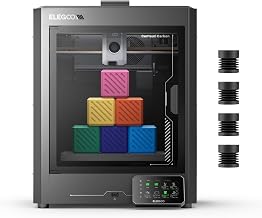
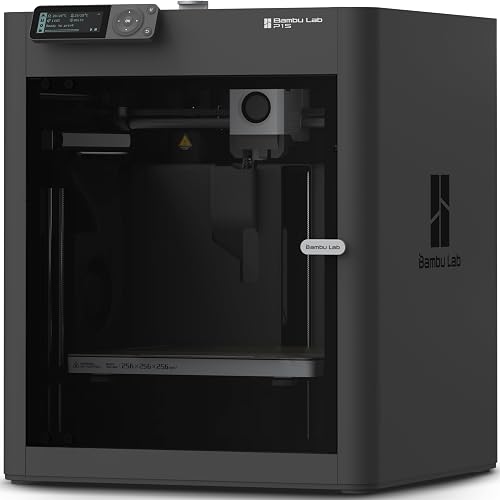
For engineering students weighing the elegoo centauri carbon vs bambu p1s engineering students decision in 2026, the short answer is this: the Bambu Lab P1S is the safer choice if you need reliable, fast prototyping with a polished software ecosystem, while the Elegoo Centauri Carbon is the smarter pick if budget is tight and you want a CoreXY enclosed printer with hardened components for carbon-fiber and glass-filled engineering filaments without spending P1S money. Both printers are enclosed CoreXY machines built for the kind of functional parts a mechanical, mechatronics, or aerospace student actually prints — jigs, fixtures, drone frames, robotics brackets, capstone enclosures — and both can handle higher-temperature engineering materials. The decision really comes down to whether you value Bambu's ecosystem maturity or Elegoo's price-to-capability ratio.
Below is a deep, student-focused buyers guide covering print quality, materials, slicer software, classroom workflow, durability, total cost of ownership over a typical four-year degree, and the specific use cases — FEA validation prints, senior design projects, club robotics — where one machine outperforms the other.
When shopping for elegoo centauri carbon vs bambu p1s engineering students, it pays to compare specs, capacity, and real-world runtime before committing.
Quick Verdict for Engineering Students
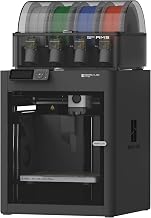
If you are a freshman or sophomore who mostly prints PLA and PETG coursework parts, either printer is overkill in a good way — they will both still be running when you graduate. The Bambu P1S earns its premium through its AMS multi-material system, mature Bambu Studio slicer, and a track record of reliability in university makerspaces. The Elegoo Centauri Carbon counters with hardened steel nozzles standard, an all-metal hotend rated for higher temps out of the box, and a substantially lower entry price that leaves room in your budget for filament, a caliper set, and a decent CAD subscription.
Head-to-Head Specifications
| Feature | Elegoo Centauri Carbon | Bambu Lab P1S |
|---|---|---|
| Kinematics | CoreXY, enclosed | CoreXY, enclosed |
| Build volume | 256 x 256 x 256 mm | 256 x 256 x 256 mm |
| Max nozzle temperature | 320 deg C | 300 deg C |
| Max bed temperature | 110 deg C | 100 deg C |
| Nozzle (stock) | Hardened steel 0.4 mm | Stainless 0.4 mm (hardened sold separately) |
| Hotend | All-metal | All-metal |
| Max print speed | 500 mm/s | 500 mm/s |
| Max acceleration | 20,000 mm/s squared | 20,000 mm/s squared |
| Multi-material | Planned add-on | AMS (4-color, expandable) |
| Auto bed leveling | Yes | Yes |
| Camera | Yes | Yes |
| Active chamber heater | No (passive) | No (passive) |
| Slicer | Elegoo Slicer (OrcaSlicer fork) | Bambu Studio |
| Approx. street price (2026) | Lower mid-range | Upper mid-range |
For the elegoo centauri carbon vs bambu p1s engineering students shortlist, here is how I rank them by student archetype:
- Mechanical engineering / robotics club member: Centauri Carbon — you will print carbon-fiber nylon and need the hardened components.
- Industrial design / product design student: Bambu P1S — color iteration with AMS speeds up prototyping reviews.
- Electrical / computer engineering student printing enclosures: Either, lean P1S for ease of use.
- Graduate researcher with grant funding: P1S, then add a Centauri Carbon as a second machine for engineering filaments.
Print Quality on Engineering Parts
Both printers are CoreXY systems with input shaping and pressure advance dialed in from the factory, so for typical PLA and PETG class assignments — gears, brackets, gripper jaws, parametric enclosures — surface finish and dimensional accuracy are indistinguishable to the naked eye. Where they diverge is on engineering-grade materials.
The Centauri Carbon's 320 deg C hotend and 110 deg C bed let it handle PA-CF (carbon-fiber nylon), PA-GF (glass-fiber nylon), PC blends, and PET-CF without needing aftermarket upgrades. For a senior design team printing a drone airframe or a Formula SAE intake plenum, that is meaningful — you can run an engineering material on day one. The P1S can print most of these too, but its 300 deg C ceiling and stock stainless nozzle mean you should plan on a hardened nozzle swap before you touch anything with carbon or glass fiber.
Layer adhesion on both machines benefits from the enclosed chamber, which keeps PETG and ABS warp-free on larger parts. Neither machine has an active chamber heater, so for true ASA or large ABS production parts you will still want to preheat the chamber by running a warmup print or adding a small space heater nearby.
Software, Network Printing, and Classroom Workflow
Bambu Studio is the more mature ecosystem in 2026. Cloud slicing, mobile monitoring, and the Maker World model library mean you can slice on a laptop in the library and start a print from your phone walking back to the dorm. If your engineering school has a shared makerspace with a few P1S units, your existing Bambu workflow scales naturally. The downside is the cloud dependency — some universities block or restrict it, and a few students prefer LAN-only mode for IP-sensitive senior projects.
Elegoo Slicer is a fork of OrcaSlicer, which itself is a fork of Bambu Studio, so the UI will feel familiar. It supports network printing on local network without forcing cloud, which research labs and engineering departments with tight IT policies tend to prefer. The trade-off is that the mobile and remote experience is less polished than Bambu's.
For coursework where you are handing files between teammates, both printers accept standard 3MF and gcode, so collaboration is not blocked either way. If you are new to slicing in general, our beginner guide to using a 3D printer walks through the slicer basics that apply to both machines.
Reliability, Maintenance, and Repairability
Engineering students print more than hobbyists. A typical mechatronics student in their junior year will easily put 800-1500 hours on a printer during prototype iteration for capstone. Both printers handle this duty cycle, but the failure modes differ.
The P1S has a well-documented parts pipeline. Replacement hotends, extruder assemblies, belts, and AMS parts are available from Bambu directly with fast shipping in North America and Europe. The community wiki is enormous. The downside is that the P1S is more locked-down than older open-source printers — firmware is closed, and modifications can void warranty support.
The Centauri Carbon is newer to the market, but Elegoo has a strong track record with the Neptune line and the Saturn resin printers for parts availability and customer service. Because the Centauri Carbon is more recent, the third-party mod ecosystem is still maturing in 2026, but the printer is more openly serviceable. If you are the kind of student who wants to tear down and rebuild your own machine — a fair number of mechanical engineering students do — the Centauri Carbon rewards that curiosity.
For ongoing care of either machine, our 3D printer maintenance guide covers belt tension, nozzle cleaning, and bed adhesion routines that extend useful life regardless of brand.
Total Cost of Ownership Across a Four-Year Degree
Sticker price is only part of the equation. Over four years, a serious engineering student will spend more on filament, nozzles, and build plate replacements than on the printer itself. Here is a realistic estimate.
The Centauri Carbon's lower entry price frees up roughly $200-300 in year-one budget. That is enough for 8-10 spools of quality PLA, two extra hardened nozzles in 0.6 mm and 0.2 mm, and a textured PEI plate replacement. The P1S's higher entry price is partly offset by the AMS bundle — if you genuinely need multi-color prints for design coursework, paying once for the AMS is cheaper than swapping filament manually for hundreds of hours.
Consumables are roughly even. Both use standard 1.75 mm filament from any vendor, and neither locks you into proprietary spools (Bambu's RFID spools work but are not required). Nozzles for the Centauri Carbon's hotend are an industry-standard form factor; P1S nozzles are Bambu-specific but widely stocked.
Product Recommendations
Best Overall for Engineering Students on a Budget: Elegoo Centauri Carbon
If your goal is to print functional engineering parts in PA-CF, PET-CF, PC, and PETG without paying premium for a multi-material ecosystem you may not use, the Centauri Carbon is the most capable printer in its price bracket in 2026. The hardened steel nozzle and 320 deg C hotend mean you are ready for engineering filaments out of the box — no upgrade path required. Pair it with a roll of PA-CF and a decent set of calipers and you can prototype capstone parts on day one. Check current pricing through your preferred retailer.
Best for Polished Workflow and Multi-Color Prototyping: Bambu Lab P1S
If you value cloud convenience, the AMS multi-material system, and the largest community knowledge base in consumer 3D printing, the P1S remains the benchmark. It is especially strong for industrial design students who iterate on color-coded prototypes, and for any student who would rather spend time on CAD than on tuning slicer profiles. Our full Bambu Lab P1S review covers the long-term ownership experience in detail.
Worth Considering: Step Up to the Bambu X1 Carbon
If your department or scholarship has a printer budget closer to $1,500, the X1 Carbon adds a lidar scanner, hardened components standard, and an active chamber sensor that pushes engineering filament performance noticeably closer to a small industrial machine. See our X1 Carbon review for the full breakdown and whether the price jump is justified for student workloads.
Which Should You Buy?
For most engineering students reading this in 2026, the decision compresses to one question: do you need multi-color prototyping more than you need stock high-temperature capability? If multi-color matters — industrial design, product design, presentation-grade demos — buy the P1S with AMS. If engineering filaments matter more — robotics, motorsports, aerospace, mechanical capstone — buy the Centauri Carbon and put the savings toward materials and tooling.
Still undecided? Our broader guide to the best enclosed 3D printers includes both machines alongside other CoreXY options, and may help you see the field more completely.
Frequently Asked Questions
Can the Elegoo Centauri Carbon print carbon-fiber nylon out of the box for engineering coursework?
Yes. The Centauri Carbon ships with a hardened steel nozzle and an all-metal hotend rated to 320 deg C, which covers PA-CF, PA-GF, and PET-CF without any upgrades. You should still dry the filament before printing and use a glue stick or PEI-suitable adhesive, but no hardware swap is required, which is uncommon at this price point.
Is the Bambu P1S worth the extra cost over the Centauri Carbon for a freshman engineering student?
If you are mostly printing PLA and PETG for first-year coursework, the P1S's premium is mostly buying you software polish and the AMS multi-material option. The Centauri Carbon prints the same materials at similar quality for less money. Most freshmen will not feel a meaningful difference until they start printing engineering filaments in sophomore or junior year.
Which printer is better for senior design and capstone projects in mechanical engineering?
For capstone work involving high-strength functional parts — gearboxes, robot end effectors, lightweight structural components — the Centauri Carbon's higher temperature ceiling and stock hardened nozzle give it a practical advantage. For capstone work focused on industrial design, presentation models, or multi-color enclosures, the P1S with AMS is the stronger pick.
Do engineering schools and university makerspaces support the Elegoo Centauri Carbon?
Adoption varies by school. Many university makerspaces have standardized on Bambu printers since 2024, so your campus shop staff may know the P1S workflow better. The Centauri Carbon uses an OrcaSlicer-based slicer that is familiar to anyone who has used Bambu Studio, so the learning curve is small. Ask your makerspace lead what they support before you buy if you plan to bring files in for help.
How long will either printer last over a four-year engineering degree?
Both printers are built for thousands of hours of use. With routine maintenance — belt tension checks, nozzle replacements every 500-800 hours of abrasive filament, periodic lubrication of linear rails — either machine will outlast a typical four-year degree. The Centauri Carbon's openness makes it easier to repair yourself; the P1S has the larger commercial parts pipeline.
Can I use either printer in a dorm room safely?
Both are enclosed, which dramatically reduces VOC exposure compared to open-frame printers, and both have HEPA-style filters available. For ABS or ASA, you still want a window cracked or a small carbon filter add-on. PLA and PETG in an enclosed machine are dorm-friendly with reasonable ventilation. Check your housing rules — some universities prohibit 3D printers in dorms regardless of safety features.
What about resin printing for detailed engineering models?
Both the Centauri Carbon and P1S are FDM (filament) printers, which suits most engineering coursework. If you also need ultra-fine detail for parts like microfluidics, miniature mechanisms, or jewelry-scale tolerances, a resin printer is a complementary tool. Our FDM vs resin guide covers when each technology makes sense.
Key Takeaways
- Choosing the right elegoo centauri carbon vs bambu p1s engineering students means matching the key features to your specific needs and budget
- Read real customer reviews and check the return policy before you commit
- Also covers: centauri carbon vs p1s for college dorm
- Also covers: best enclosed printer for mech eng students
- Also covers: centauri carbon abs printing comparison
- Compare value across models — the priciest option is not always the best fit