Comparison: top FDM 3D printers for tactile maps in 2026
| Printer | Build Volume | Min Layer Height | Auto-Level | Enclosed | Best For |
|---|---|---|---|---|---|
| Prusa MK4S | 250 x 210 x 220 mm | 0.05 mm | Load-cell ABL | No (optional enclosure) | Highest-fidelity braille, long-term reliability |
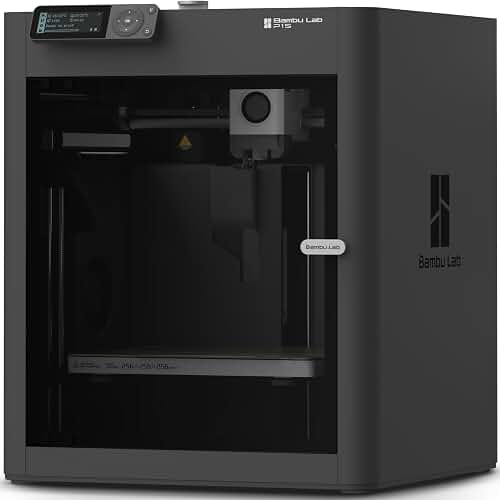
| Bambu Lab P1S | 256 x 256 x 256 mm | 0.08 mm | Lidar + ABL | Yes | Classroom use, multi-color tactile maps with AMS |
| Bambu Lab A1 | 256 x 256 x 256 mm | 0.08 mm | Full auto-cal | No | Budget-friendly tactile map workflow |
| Bambu Lab X1 Carbon | 256 x 256 x 256 mm | 0.08 mm | Lidar + ABL | Yes | High-throughput tactile labs producing for entire districts |
| Creality Ender 3 V3 SE | 220 x 220 x 250 mm | 0.1 mm | CR Touch | No | Pilot programs / single-classroom budgets under $250 |
The best 3d printer for tactile maps for blind students in 2026 is a mid-to-large format FDM (filament) machine with a build area of at least 250 x 250 mm, a Z-resolution of 0.08 mm or finer, and rock-solid first-layer consistency. Tactile maps need crisp raised features, smooth braille dots that conform to Library of Congress or BANA specs (roughly 1.5 mm dome height, 2.3 mm base diameter), and warp-free surfaces large enough to print a U.S. state, campus, or floor plan on a single sheet. FDM printers using PLA filament hit the sweet spot: durable, low-odor, classroom-safe, and inexpensive enough that a teacher of the visually impaired (TVI) can produce dozens of maps per semester without blowing the assistive-tech budget.
Resin (MSLA) printers can produce sharper braille, but resin is toxic to handle, smells strong, and requires post-curing — not realistic for a K-12 classroom or even most universities' disability services offices. That's why every major tactile-graphics program we surveyed (Perkins, APH, See3D, the BTactile network) standardizes on FDM. Below we break down what to look for, then recommend specific 2026 printers that fit those needs.
What makes a 3D printer good for tactile maps?
Tactile maps are unlike most 3D prints. They are wide and flat (often 200 x 280 mm or larger), feature dozens of tiny raised symbols and braille labels, and must be readable by touch — meaning every dot, line, and texture has to come out clean on the very first layer. When evaluating the best 3d printer for tactile maps for blind students, focus on these properties:
- Build plate size: 220 x 220 mm is the bare minimum; 256 x 256 mm or larger lets you fit a letter-size (8.5 x 11 in) map without tiling.
- Bed flatness and auto-leveling: Tactile maps live or die on a perfect first layer. Look for automatic mesh bed leveling (ABL) and a PEI-coated spring steel sheet.
- Z-resolution: 0.08 mm layers reproduce braille dome curvature smoothly. 0.2 mm layers will feel ridged under a finger.
- Nozzle options: A 0.4 mm nozzle is standard, but a swappable 0.25 mm nozzle lets you print sharper braille at the cost of speed.
- Enclosure (optional): Helps with ABS/ASA, but PLA-only workflows don't strictly need one. An enclosure does cut noise — useful in shared classrooms.
- Reliability and ease of use: TVIs are not 3D-printer hobbyists. The printer must "just work" after a one-touch start.
- Filament compatibility: PLA is the standard for tactile graphics. Some programs also use PETG for durability or TPU for flexible overlays.
You do not need ultra-fast speeds (CoreXY printers exceeding 500 mm/s) for tactile work. In fact, slower, more deliberate printing usually produces better braille. So our picks below skew toward reliability and bed size over raw speed.
Our top picks for tactile-map 3D printing
1. Prusa MK4S — best overall for tactile-graphics fidelity
The Prusa MK4S is the gold standard in accessibility 3D printing. Its load-cell-based first-layer calibration produces dead-flat prints across the entire 250 x 210 mm bed — exactly what you want when a 200 mm-long raised contour line cannot have any dips. With 0.05 mm minimum layer height and the Nextruder hotend, braille dots come out smooth and dome-shaped rather than stepped. Prusa also publishes Open Source firmware, which matters when school IT departments want to vet the device. Multiple U.S. braille-production centers (including programs at APH partner sites) standardize on Prusa hardware. If you can stretch the budget to ~$1,099, this is the printer to buy. See our Prusa MK4S review for a deep dive on print quality.
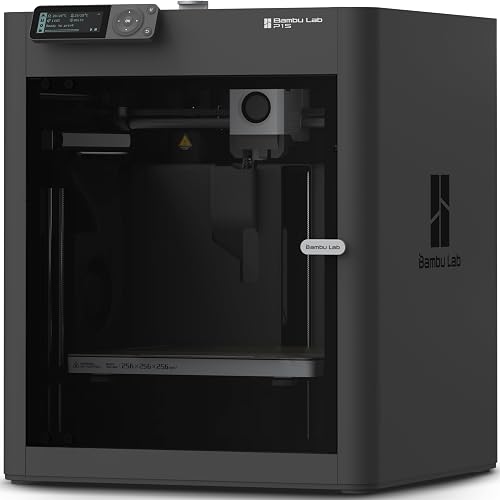
2. Bambu Lab P1S — best enclosed option for classroom use
The Bambu Lab P1S is our top pick when the printer will live in a classroom or shared office. The full enclosure muffles noise (a real consideration for blind students who rely on audio cues), traps fine particulates, and keeps curious hands away from the hot end. The 256 x 256 mm bed easily fits a full letter-size tactile map, and with the optional AMS unit you can print multi-color tactile maps — say, a campus map where buildings are one color/texture and walkways another — giving low-vision students additional visual cues alongside the tactile ones. At around $700 standalone, it's an excellent value. Pair this with our Bambu Lab P1S review for setup tips.
https://www.amazon.com/dp/B0CHDM8VVZ?tag=extruly-20
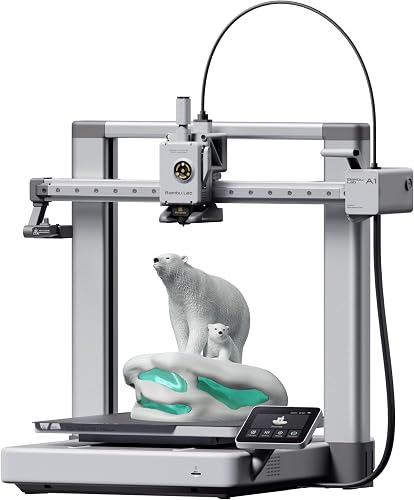
3. Bambu Lab A1 — best budget option with full auto-calibration
If $700 is too much, the open-frame Bambu Lab A1 brings the same 256 x 256 mm bed and fully automated calibration down to around $400. It is louder than the P1S and has no enclosure, but for a single TVI producing a few maps a week from a quiet office, that's not a problem. The A1 also supports the AMS lite for up to 4-color printing, which is a huge bonus for color-coded tactile graphics designed for low-vision (rather than fully blind) students. Read our full Bambu Lab A1 Mini review for context on the A1 family.
https://www.amazon.com/dp/B0D17TMWFB?tag=extruly-20
4. Bambu Lab X1 Carbon — best for districts producing tactile materials at scale
If you run a district-level tactile materials lab or a state-funded outreach service producing hundreds of maps a year, the X1 Carbon is worth the premium. Its hardened steel components handle abrasive filaments (carbon-fiber-reinforced PLA for extra-durable maps that survive years of student handling), and the lidar-assisted first-layer inspection automatically rejects bad starts — saving filament and TVI time. The 16-channel multi-color AMS opens up rich, layered tactile-visual maps. At around $1,400, it's an investment, but the throughput justifies it for large programs.
5. Creality Ender 3 V3 SE — best entry point for pilot programs
For a pilot project, a grant-funded classroom, or a teacher who just wants to test the tactile-map workflow before scaling up, the Ender 3 V3 SE at around $200 is hard to beat. It includes CR Touch auto-leveling, a direct-drive extruder, and a 220 x 220 mm bed — enough for most single-page tactile maps. The trade-off is more hands-on tuning and a noisier print process, but the price point is so low that you can buy two for the cost of one mid-range machine. We cover its strengths in our best 3D printers for beginners roundup.
How to design and slice tactile maps
The printer is only half the equation. Tactile map files come from a few common pipelines:
- TMAP / Touch Mapper — web tools that turn OpenStreetMap data into printable STL files of any neighborhood or city.
- Tactile Maps Automated Production (TMAP) from the Smith-Kettlewell Eye Research Institute generates customized street maps with braille labels.
- BANA / APH templates for U.S. state maps, world maps, and floor plans.
- Custom design in Tinkercad or Blender for campus-specific maps and floor plans.
When slicing, set your first-layer height to 0.2 mm at 50% speed, use a 0.4 mm nozzle for standard maps (or 0.25 mm for high-density braille), and disable any "ironing" passes — they flatten braille dots. A PLA temperature of 210 °C and bed temperature of 60 °C are good starting points. Print at 60–80 mm/s for clean detail; tactile maps are not a place to chase speed.
Filament choices for tactile graphics
PLA is the default — non-toxic, low-odor, biodegradable, and cheap. For maps that will be handled daily by classes of students, PETG holds up better to wear but is slightly harder to print cleanly. TPU (flexible filament) is occasionally used for raised overlays placed on top of paper maps. Avoid ABS in any classroom setting due to fumes. Always purchase filament from reputable brands; off-brand PLA with inconsistent diameter ruins fine braille details. If you're new to PLA, our PLA filament guide covers the basics.
Budget planning for a tactile-graphics 3D printer program
A realistic budget breakdown for a single-classroom tactile-map setup in 2026:
- Printer: $200–$1,400 depending on tier
- Filament (10 spools PLA, mixed colors): ~$200
- Extra build plate (smooth PEI for fine details): ~$30
- 0.25 mm nozzle for high-density braille: ~$15
- Annual maintenance (nozzles, belts, lubricant): ~$50
Most TVIs we've spoken to recommend budgeting around $1,000 total for a sustainable mid-tier setup. For broader budget guidance see our 3D printer budget guide.
Frequently Asked Questions
What is the best 3D printer for printing braille and tactile maps in a school setting?
The Prusa MK4S is the most reliable choice thanks to its load-cell first-layer calibration and 0.05 mm minimum layer height, but the Bambu Lab P1S is the better pick when the printer must live in a shared classroom because of its enclosure, quieter operation, and 256 x 256 mm bed that fits letter-size maps.
Can I print braille that meets Library of Congress specifications on a $300 3D printer?
Yes. Models like the Creality Ender 3 V3 SE and Bambu Lab A1 can reproduce LoC-compliant braille (1.5 mm dome height, 2.3 mm base, 2.5 mm spacing) when set to 0.08 mm layers, 60 mm/s, and a 0.25 mm or 0.4 mm nozzle. The key variables are first-layer consistency and slicer settings, not the price tag.
Is resin or FDM better for tactile maps for blind students?
FDM is overwhelmingly preferred for classroom tactile-map production. Resin produces sharper braille, but the toxicity, odor, and post-curing requirements make it impractical for K-12 environments and most university disability services offices.
What filament should I use for tactile maps used by blind students?
Standard PLA is the recommended starting point — it's classroom-safe, low-odor, and prints cleanly with smooth dome shapes for braille. For maps that will see heavy daily handling, PETG offers better long-term durability. Avoid ABS in any classroom because of fume concerns.
How long does it take to 3D print a typical tactile map?
A letter-size tactile street map with braille labels takes 2–5 hours on most consumer FDM printers at quality settings (0.12 mm layers, 60 mm/s). Larger U.S. state maps or detailed campus floor plans can run 6–10 hours. Printing overnight or during the school day in batches is common practice.
Do I need an enclosed 3D printer for a classroom of blind students?
An enclosure isn't strictly required for PLA — the recommended filament — but it offers two real benefits in a classroom: reduced noise (important when audio cues matter) and a physical barrier preventing accidental contact with hot components. See our best enclosed 3D printers roundup for options.
Where can I download ready-made tactile map STL files?
Free tactile-graphics libraries include See3D, the Smith-Kettlewell TMAP service, Touch Mapper (OpenStreetMap-based), Thingiverse's accessibility tag, and the BTactile aggregator. APH (American Printing House for the Blind) also distributes vetted tactile-graphic files through its accessible media producers' network.
Key Takeaways
- Choosing the right best 3d printer for tactile maps for blind students means matching the key features to your specific needs and budget
- Read real customer reviews and check the return policy before you commit
- Also covers: 3d printer for accessibility educators
- Also covers: raised line map printer for vision impaired
- Also covers: tactile graphics 3d printer for schools
- Compare value across models — the priciest option is not always the best fit