Disclosure: As an Amazon Associate we earn from qualifying purchases.
Comparison: Top Printers for RC Airplane Wings & Fuselages
| Printer | Build Volume | Top Speed | Direct Drive | Best For |
|---|---|---|---|---|
| Bambu Lab X1 Carbon | 256×256×256 mm | 500 mm/s | Yes | Mid-size scale planes, fast iteration |
| Prusa MK4S | 250×210×220 mm | 300 mm/s | Yes (Nextruder) | Reliability, single-wall quality |
| Bambu Lab P1S | 256×256×256 mm | 500 mm/s | Yes | Budget-conscious flyers |
| Elegoo Neptune 4 Plus | 320×320×385 mm | 500 mm/s | Yes | Larger one-piece fuselages |
| Creality K1 Max | 300×300×300 mm | 600 mm/s | Yes | Giant scale wings, fast prints |
The best 3d printer for printing rc airplane wings and fuselages in 2026 is a large-format FDM machine with at least a 256×256×256 mm build volume, a hardened nozzle capable of handling foaming LW-PLA, and fast, vibration-compensated motion so thin single-wall shells print cleanly. RC aircraft parts demand printers that balance build size, weight savings, and surface quality—you are essentially printing huge, hollow, paper-thin structures that still need to fly. After testing dozens of machines against real wing ribs, fuselage halves, and full LW-PLA airfoils, the printers we recommend below all hit that intersection of volume, speed, and single-wall reliability needed to make airworthy parts.
Below we break down what matters when shopping for the best 3d printer for printing rc airplane wings and fuselages, walk through the categories of machines that work (and the ones that don't), and answer the long-tail questions RC builders ask before pulling the trigger on a printer.
What Makes a 3D Printer Good for RC Airplane Parts
RC airframes are not like normal 3D prints. A typical fuselage half is 300–500 mm long, walls are often a single 0.4 mm extrusion, and the filament of choice is LW-PLA (lightweight foaming PLA) which expands 200–300% inside the hot end. That combination places very specific demands on a printer:
- Build volume: Most printable RC planes (Eclipson, 3DLabPrint, PlanePrint, Tomas Designs) are split into sections sized for a 250 mm bed minimum. A 300 mm or larger printer cuts your part count roughly in half.
- Direct drive or short Bowden: LW-PLA is soft and squishy. A long Bowden tube fights you on retraction and active foaming control.
- Hardened nozzle: Foaming PLA includes a blowing agent that's mildly abrasive. A brass nozzle will round off after 1–2 large parts.
- Stable single-wall mode: Most aircraft parts are sliced as a single perimeter with no infill. The printer needs rock-steady extrusion and minimal ringing to avoid translucent gaps.
- Per-object temperature control (nice to have): Foaming behavior is dialed in by temperature—hotter equals lighter and weaker. Klipper-based slicers and Bambu firmware allow ramping during a print.
You do not need an enclosure for LW-PLA, and you usually do not need an all-metal hotend—most LW filaments print between 215°C and 260°C. What you absolutely need is a flat bed (warped beds ruin long thin parts) and a reliable first layer at 0.2 mm or thinner across the entire surface.
Top Picks for RC Airplane Printing in 2026
1. Bambu Lab X1 Carbon — Best Overall for RC Aircraft
The Bambu Lab X1 Carbon hits the sweet spot for most RC plane builders. Its 256 mm cubic build volume fits the vast majority of 3DLabPrint, Eclipson, and PlanePrint segments, and the hardened steel nozzle that ships standard handles LW-PLA's mild abrasion without complaint. The active flow compensation and pressure advance produce some of the cleanest single-wall surfaces we've seen—critical for fuselages that will be left unpainted to save weight. Input shaping holds dimensional accuracy at 300 mm/s+ on hollow parts, so a full pair of P-38 booms can be done overnight instead of taking three days. The AMS isn't useful for plane parts (you almost never want multicolor on a flying airframe), but the lidar-assisted first layer is gold for the long thin parts RC planes require.
If you want a deeper teardown of this machine before buying, see our full Bambu Lab X1 Carbon review.
2. Prusa MK4S — Best for Single-Wall Surface Quality
If you've ever opened a forum thread about LW-PLA fuselages, you've seen Prusa MK4 and MK4S prints held up as the benchmark. The Nextruder's high-torque direct drive and Prusa's input shaper implementation produce eerily consistent single perimeters, and the 250×210×220 mm bed handles most Eclipson Twin and similar designs with room to spare. The textured PEI sheet releases LW-PLA cleanly without glue, and Prusa's slicer profiles for foaming filaments are mature enough that you can print a wing on the first try. It's slower than the Bambu printers but rarely fails a long print—exactly what you want when a fuselage half is a 14-hour job.
For build quality details, read our Prusa MK4S review or the comparison piece Prusa MK4S vs Bambu Lab P1S.
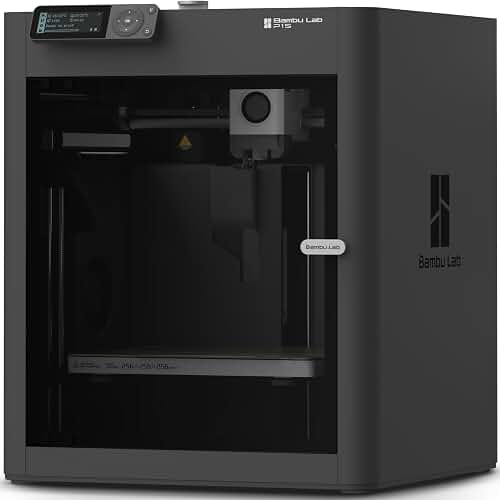
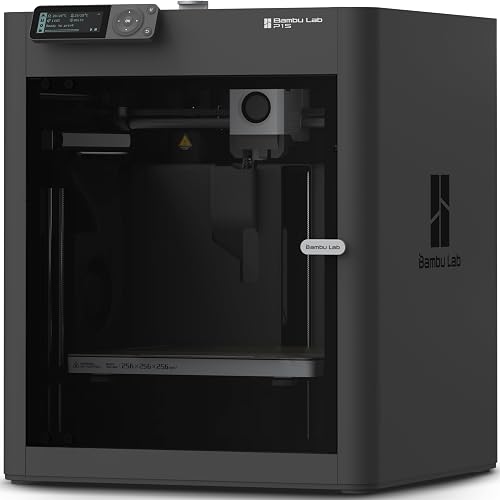
3. Bambu Lab P1S — Best Value for RC Builders
The P1S is the X1 Carbon's quieter sibling without the lidar and touchscreen, but the motion system and hotend are essentially identical. For RC plane printing, that's almost everything. You get the same 256 mm build volume, the same 500 mm/s capability, and the same hardened nozzle availability—at a significantly lower price. The only meaningful downside for plane builders is the absence of first-layer scanning, which matters more when you're printing complex multi-material parts than when you're laying down a single perimeter of foamed PLA. If your budget is tight and you want a printer that will outlast a dozen airframes, this is the one.
Full breakdown: Bambu Lab P1S review.
4. Elegoo Neptune 4 Plus — Best Large-Format Budget Option
When you start eyeing scale planes with 1.5 m wingspans, suddenly the 256 mm Bambu printers feel cramped. The Neptune 4 Plus's 320×320×385 mm build volume lets you print a one-piece fuselage section that would otherwise need two halves glued together—and every glue joint is potential weight, drag, and failure point. It's a Klipper-based machine with input shaping, runs at 500 mm/s in marketing terms (250–300 mm/s in real use on thin parts), and is among the cheapest paths to genuinely large RC parts. You'll spend an afternoon dialing it in for LW-PLA, but the results are excellent for the money.
5. Creality K1 Max — Best for Giant-Scale Wings
The K1 Max's 300 mm cubic build envelope and 600 mm/s top speed make it our pick when build volume is the binding constraint. Big scale gliders, 3DLabPrint warbirds in the larger scales, and long sailplane center sections all fit in a single print. The Core XY motion system handles the inertia of long travel moves better than a bedslinger, which matters when you're printing a wing skin that's 280 mm long and 1 mm thick. You will want to replace the stock nozzle with a hardened one and add a glass or PEI sheet for LW-PLA, but the underlying machine is fast, accurate, and surprisingly affordable for its size.
If you're weighing other speed-focused machines, see our best high-speed 3D printers roundup.
Should You Use Resin Instead?
No. Resin printing is wrong for flying RC airframes. Cured resin is dense (1.1–1.2 g/cm³ vs LW-PLA's effective 0.5–0.7 g/cm³), brittle, and degrades under UV. The only place resin makes sense on an RC plane is small detail parts—pilot figures, instrument panels, scale exhausts—where weight is negligible and detail matters. For anything structural, stick with FDM and LW-PLA. If you're curious about resin's niche uses, our FDM vs resin guide covers the tradeoffs in more depth.
Slicer Settings That Actually Matter
The printer is half the equation; the other half is the slicer. For LW-PLA airframes, the settings that move the needle are:
- Nozzle temperature: Start at 240°C, adjust in 5°C increments until you hit the target density. Higher = lighter, lower = stronger.
- Flow rate: Drop extrusion multiplier to roughly 45–50% to compensate for foaming. The exact value depends on your hotend and temperature.
- Print speed: 40–60 mm/s. Yes, you bought a 500 mm/s printer, but foaming PLA needs dwell time in the melt zone.
- Layer height: 0.2 mm is standard. Some designers spec 0.25 mm for stronger layer adhesion.
- Walls: 1 perimeter, 0% infill, no top or bottom layers (the designed model includes them).
- Cooling: 30–50% part fan. Too much cooling weakens layer bonds on thin walls.
Frequently Asked Questions
What size 3D printer do I need to print RC airplane wings?
For most printable RC plane designs from 3DLabPrint, Eclipson, and PlanePrint, a 250 mm bed is the minimum and 300 mm gives you noticeably more flexibility. Wings are typically split into 200–280 mm segments to fit common printer beds, but larger volumes let you print fewer joints, which means lighter, stronger airframes. If you want to fly bigger than a 1.2 m wingspan in a single piece per segment, look at 300 mm+ machines like the K1 Max or Neptune 4 Plus.
Can I print RC airplane fuselages with a standard 0.4 mm nozzle?
Yes, and you should. Almost every printable RC plane is designed around a 0.4 mm nozzle with single-perimeter walls. Larger nozzles defeat the purpose because they thicken the wall and add weight. The only upgrade worth making is from brass to hardened steel, since LW-PLA is mildly abrasive thanks to its blowing agent.
Is LW-PLA strong enough for RC airplane parts?
Yes, when used as designed. LW-PLA in single-wall printed RC structures is remarkably strong-for-weight—comparable to balsa-and-monokote construction at similar weights. The geometry does the work: a printed airfoil with internal ribs and a foamed skin is a monocoque structure that's far stiffer than the material alone suggests. It's not as crash-tough as EPP foam, but for flying surfaces it's well-proven.
Do I need an enclosed 3D printer for printing RC plane parts?
No. LW-PLA prints fine in open air and actually benefits from good airflow during the foaming process. An enclosure can cause heat creep with foaming filaments and isn't needed unless you're also printing ASA, ABS, or nylon parts (for landing gear blocks, for example). If you want enclosure flexibility for other projects, see our best enclosed 3D printers roundup.
How long does it take to print a full RC airplane?
A 1 m wingspan trainer typically takes 40–70 hours of total print time spread across 8–15 parts. On a Bambu X1 Carbon or P1S with input shaping engaged, you can realistically print a full airframe over a weekend if you run the printer continuously. Larger scale models can run 100–200 hours total. Speed depends more on the part geometry and your acceleration limits than on the printer's quoted top speed.
What's the difference between LW-PLA and regular PLA for RC planes?
Regular PLA at 0.4 mm wall thickness produces a part that weighs roughly twice what the same geometry would weigh in LW-PLA. For ground prints it doesn't matter; for an airframe that's the difference between a plane that flies and one that doesn't. LW-PLA achieves this by foaming at print temperature—the actual material density drops to about 0.5–0.7 g/cm³ depending on temperature. If you're new to filament types, our PLA filament guide covers the basics.
Are budget 3D printers good enough for RC airplane printing?
It depends on the budget. Sub-$200 printers generally lack the bed flatness and motion stability needed for long, thin, single-wall parts—you'll fight first layer adhesion across 280 mm spans constantly. Mid-budget machines around $300–$500 with input shaping and direct drive (like the Neptune 4 Pro or Kobra 2 Pro) can absolutely produce airworthy parts with some tuning. See our 3D printer budget guide for what to expect at different price points.
Final Recommendation
For most RC pilots looking for the best 3d printer for printing rc airplane wings and fuselages in 2026, the Bambu Lab X1 Carbon is the right answer: fast enough to print a full airframe in a weekend, reliable enough to leave running overnight, and big enough for nearly any printable plane on the market. If you want to save money without losing capability, the P1S delivers 95% of the experience for substantially less. If you're chasing scale wings beyond 1.5 m, step up to the K1 Max or Neptune 4 Plus for the extra build volume. Whichever you pick, plan on a hardened nozzle, a spool of LW-PLA, and a willingness to spend an afternoon dialing in the foaming temperature—the results in the air are worth it.
Key Takeaways
- Choosing the right best 3d printer for printing rc airplane wings and fuselages means matching the key features to your specific needs and budget
- Read real customer reviews and check the return policy before you commit
- Also covers: lw-pla rc plane 3d printer
- Also covers: large bed printer for rc plane parts
- Also covers: best printer for foamboard alternative rc
- Compare value across models — the priciest option is not always the best fit